Índice
- Filtro fraco vs. filtro forte: a diferença entre “trocar tudo” e “aplicar por cima”
- Como usar estes prompts no Gemini
- 🤠 Filtro clássico do Velho Oeste
- 📷 Efeito de fotografia antiga
- 🌵 Ambientação leve de faroeste
- Como adaptar qualquer prompt destes
- Amanda aconselha
- O que pode dar errado (e como evitar)
- FAQ
Filtro fraco vs. filtro forte: a diferença entre “trocar tudo” e “aplicar por cima”
| Elemento | Prompt fraco | Prompt forte |
|---|---|---|
| O que muda na imagem | “me deixa estilo velho oeste” | “apply a Red Dead Redemption-style Old West filter to the attached photo, keeping the original background and composition” |
| Preservação do rosto | não informada | “keep the person’s exact facial features and identity unchanged, do not alter or distort the face” |
| Cor e textura | não informada | “warm sepia and dusty color grading, cinematic western film grain, subtle vignette” |
| O que NÃO fazer | não informado | “do not change the background scenery or replace the setting” |
A frase “keeping the original background and composition” é o que diferencia um filtro de uma transformação completa de cenário — sem ela, o Gemini pode te colocar literalmente num deserto, o que nem sempre é o efeito que você quer.
Como usar estes prompts no Gemini
- Use qualquer foto sua que já goste da composição — o objetivo aqui é manter o fundo, só mudar o clima e a cor.
- Cole o prompt junto com a foto na mesma mensagem.
- Se o Gemini trocar o cenário sem você pedir, reforce: “keep the exact same background from the original photo, only change the color grading and add film texture”.
- Se o rosto sair alterado, peça: “redo this keeping the exact same face as the original photo, only apply the color and texture filter”.
- Esses prompts funcionam bem em fotos de rosto, meio-corpo ou corpo inteiro — diferente das trends anteriores, aqui não é necessário reconstruir uma cena inteira.
🤠 Filtro clássico do Velho Oeste
O visual mais direto da trend: cor quente, poeira e clima de faroeste sobre a sua foto original.
1. Filtro sépia clássico
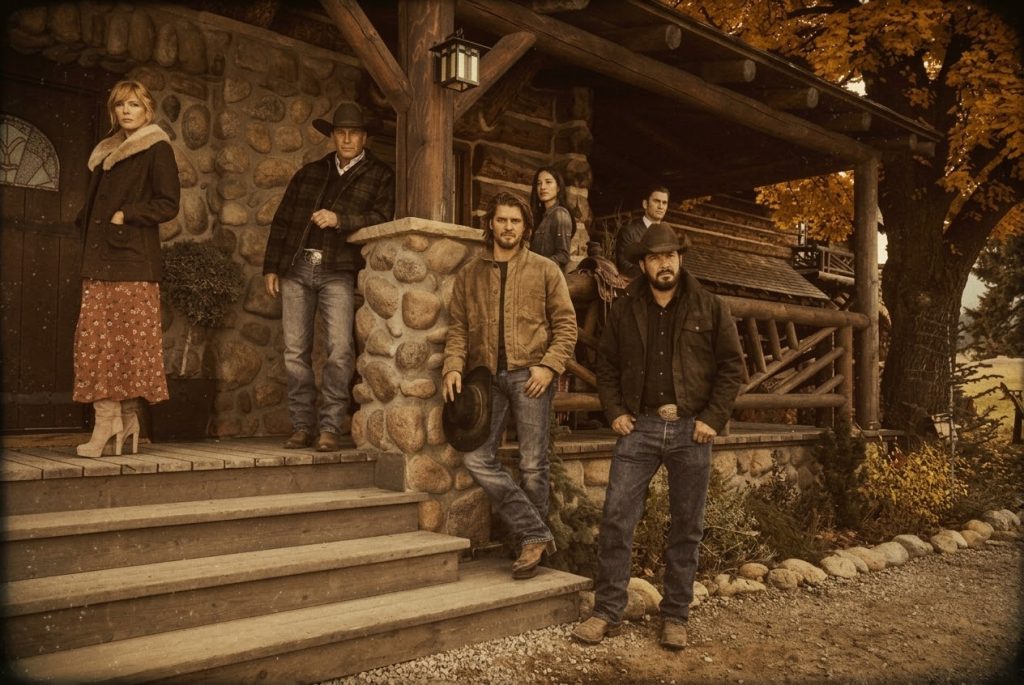
Apply a Red Dead Redemption-style Old West filter to the attached photo, keeping the original background and composition, warm sepia and dusty color grading, cinematic western film grain, subtle vignette, do not change the background scenery or replace the setting, keep the person's exact facial features and identity unchanged, do not alter or distort the face
Ideal para: o efeito mais parecido com um filtro pronto de rede social.
2. Poeira e luz quente
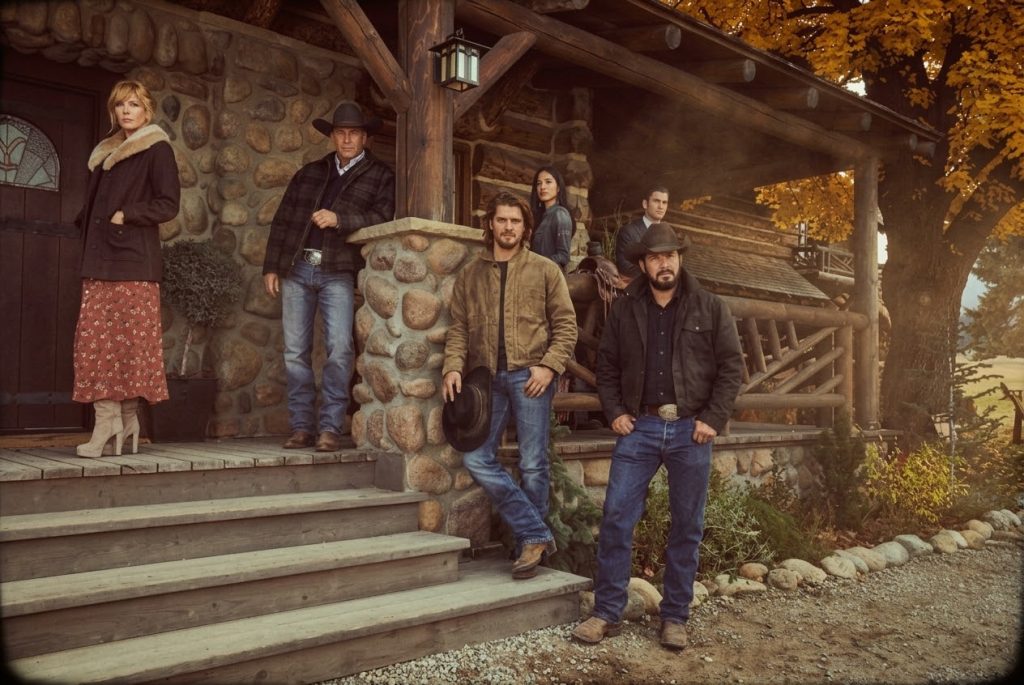
Apply a Red Dead Redemption-style Old West filter to the attached photo, keeping the original background and composition, add a subtle dusty haze and warm golden light, cinematic western color grading, do not change the background scenery or replace the setting, keep the person's exact facial features and identity unchanged, do not alter or distort the face
Ideal para: clima de tarde poeirenta no deserto, sem trocar o fundo.
3. Contraste dramático estilo cinema
Apply a Red Dead Redemption-style Old West filter to the attached photo, keeping the original background and composition, high contrast cinematic western color grading, deep shadows, warm highlights, do not change the background scenery or replace the setting, keep the person's exact facial features and identity unchanged, do not alter or distort the face
Ideal para: quem quer um efeito mais dramático e de cinema.
4. Tom desbotado de pôster antigo
Apply a Red Dead Redemption-style Old West filter to the attached photo, keeping the original background and composition, faded vintage poster color tones, slightly desaturated palette, subtle film grain, do not change the background scenery or replace the setting, keep the person's exact facial features and identity unchanged, do not alter or distort the face
Ideal para: um efeito mais suave, menos saturado.
5. Entardecer no estilo do jogo
Apply a Red Dead Redemption-style Old West filter to the attached photo, keeping the original background and composition, warm orange and red sunset color grading, cinematic western atmosphere, do not change the background scenery or replace the setting, keep the person's exact facial features and identity unchanged, do not alter or distort the face
Ideal para: fotos tiradas no fim de tarde, realça o clima natural.
📷 Efeito de fotografia antiga
Prompts que imitam o visual de foto revelada em estúdio de época, tipo retrato de cowboy antigo.
6. Retrato tipo daguerreótipo
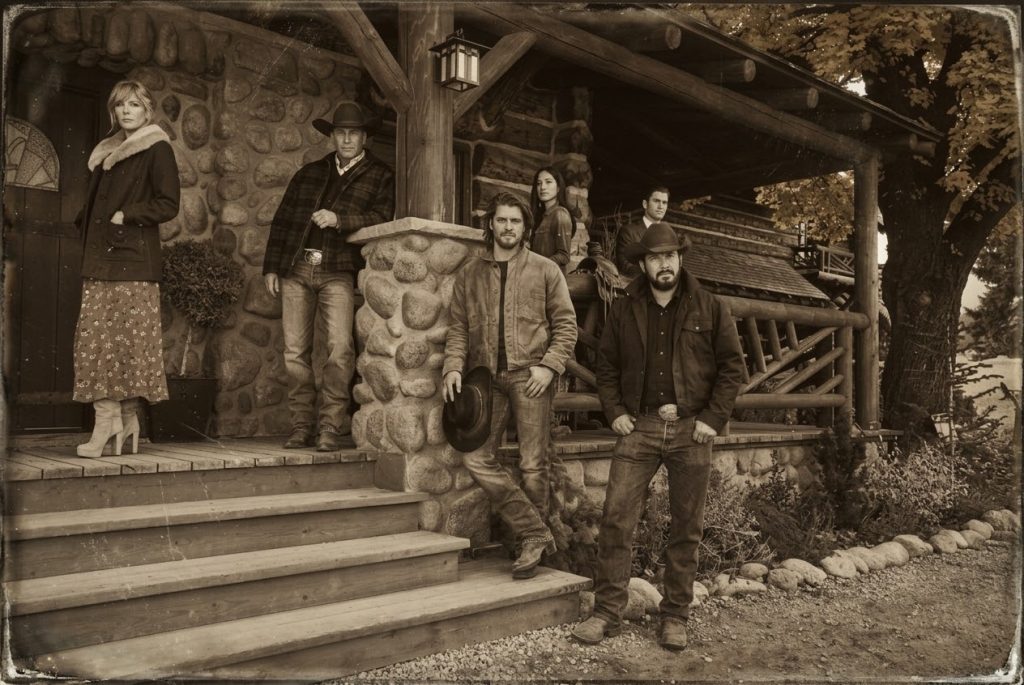
Apply an old western daguerreotype-style photo filter to the attached photo, keeping the original composition, monochrome sepia tones, soft vignette, subtle scratches and grain typical of 1800s photography, do not change the background scenery or replace the setting, keep the person's exact facial features and identity unchanged, do not alter or distort the face
Ideal para: o efeito mais “foto de museu” da lista.
7. Foto de estúdio de época
Apply an old western studio portrait filter to the attached photo, keeping the original composition, warm sepia tones, soft diffused lighting typical of early photography studios, do not change the background scenery or replace the setting, keep the person's exact facial features and identity unchanged, do not alter or distort the face
Ideal para: um efeito mais elegante e menos “sujo”.
8. Papel amarelado e cantos gastos
Apply an old western vintage photograph filter to the attached photo, keeping the original composition, yellowed aged paper tones, worn edges effect, subtle sepia color grading, do not change the background scenery or replace the setting, keep the person's exact facial features and identity unchanged, do not alter or distort the face
Ideal para: clima de foto encontrada num baú antigo.
9. Preto e branco cinematográfico
Apply an old western black and white cinematic filter to the attached photo, keeping the original composition, high contrast monochrome grading, subtle film grain, do not change the background scenery or replace the setting, keep the person's exact facial features and identity unchanged, do not alter or distort the face
Ideal para: um efeito mais sóbrio, sem cor.
10. Vinheta forte estilo retrato de parede de saloon
Apply an old western saloon portrait filter to the attached photo, keeping the original composition, strong vignette, warm brownish sepia tones, soft focus at the edges, do not change the background scenery or replace the setting, keep the person's exact facial features and identity unchanged, do not alter or distort the face
Ideal para: clima de “quadro pendurado no bar”.
🌵 Ambientação leve de faroeste
Prompts que mantêm o fundo real da sua foto, mas adicionam elementos discretos de atmosfera — poeira, luz e clima, sem reconstruir a cena.
11. Névoa de poeira sutil
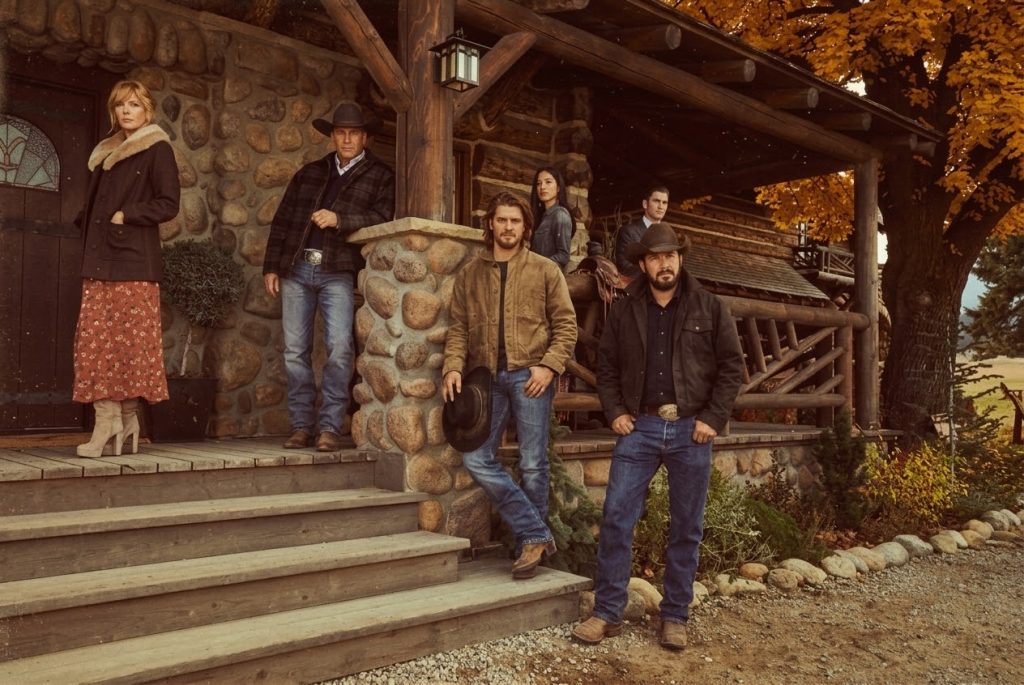
Apply a Red Dead Redemption-style Old West filter to the attached photo, keeping the exact original background, add a very subtle dust particle effect in the air, warm cinematic color grading, do not change the background scenery or replace the setting, keep the person's exact facial features and identity unchanged, do not alter or distort the face
Ideal para: um toque de atmosfera sem exagerar.
12. Luz de lampião
Apply a Red Dead Redemption-style Old West filter to the attached photo, keeping the exact original background, add warm lantern-like lighting tones typical of the game's night scenes, cinematic western color grading, do not change the background scenery or replace the setting, keep the person's exact facial features and identity unchanged, do not alter or distort the face
Ideal para: fotos noturnas ou de ambiente fechado.
13. Filtro de “cutscene” do jogo
Apply a Red Dead Redemption-style cinematic cutscene filter to the attached photo, keeping the exact original background, dramatic warm color grading, subtle film grain and slight letterbox cinematic framing, do not change the background scenery or replace the setting, keep the person's exact facial features and identity unchanged, do not alter or distort the face
Ideal para: o efeito mais “cena de jogo”, com barras de cinema.
14. Manhã enevoada no estilo do jogo
Apply a Red Dead Redemption-style Old West filter to the attached photo, keeping the exact original background, add a soft cool morning mist tone, muted cinematic color grading, do not change the background scenery or replace the setting, keep the person's exact facial features and identity unchanged, do not alter or distort the face
Ideal para: fotos claras, de manhã, clima mais frio e suave.
15. Filtro de fim de tarde intenso
Apply a Red Dead Redemption-style Old West filter to the attached photo, keeping the exact original background, intense warm late afternoon color grading, long dramatic shadows, do not change the background scenery or replace the setting, keep the person's exact facial features and identity unchanged, do not alter or distort the face
Ideal para: fechar a série com o efeito mais impactante.
Como adaptar qualquer prompt destes
- Ajustar a intensidade do filtro: adicione “subtle” antes da descrição da cor pra um efeito mais discreto, ou “intense” pra um efeito mais forte.
- Trocar entre cor e preto e branco: troque a descrição de cor por “black and white” mantendo o resto do prompt igual.
- Adicionar textura de filme: inclua “35mm film grain” pra um efeito mais granulado e menos “digital”.
- Garantir que o fundo não mude: se o Gemini trocar o cenário mesmo assim, repita com mais ênfase: “this is a color and texture filter only, the background must remain exactly the same as the original photo”.
👉 Amanda aconselha:
- Se você quer postar nos Stories: os prompts da categoria “filtro clássico” são os mais parecidos com um filtro pronto de rede social.
- Se você tem uma foto em ambiente aberto, tipo trilha ou fazenda: os prompts de “ambientação leve” vão parecer mais naturais, porque já combinam com esse tipo de cenário.
- Se você quer uma foto pra imprimir ou emoldurar: vá de categoria “fotografia antiga” — o efeito de retrato de época fica ótimo em preto e branco ou sépia.
- Se o Gemini insistir em mudar o fundo da foto: repita o prompt reforçando “mantenha exatamente o mesmo fundo” — às vezes é preciso pedir duas vezes.
O que pode dar errado (e como evitar)
- O Gemini troca o cenário sem pedir: mesmo com a instrução de manter o fundo, às vezes o modelo “viaja” e substitui o ambiente — repita reforçando que é só um filtro de cor.
- Filtro fica exagerado, quase irreconhecível: se isso acontecer, peça pra reduzir a intensidade: “apply a more subtle version of this filter, closer to the original photo’s colors”.
- Rosto muito escuro em filtros noturnos: em prompts com luz de lampião ou noite, use uma foto original bem iluminada — senão o rosto pode ficar difícil de reconhecer depois do filtro.
- Textura de filme cobrindo detalhes importantes: se o grão ficar forte demais, peça “reduce the film grain intensity” mantendo o resto do prompt.
FAQ
Esse filtro funciona em qualquer tipo de foto?
Funciona melhor em fotos com boa iluminação e fundo simples. Fotos muito escuras ou com muita informação visual no fundo podem dificultar o Gemini manter tudo exatamente igual ao aplicar o filtro.
Por que o Gemini trocou o fundo da minha foto mesmo eu pedindo pra manter?
Às vezes o modelo interpreta o pedido de “estilo Velho Oeste” como uma solicitação de cenário novo. Repetir o prompt reforçando “isto é apenas um filtro de cor, o fundo deve permanecer exatamente igual ao original” costuma resolver.
Esse filtro é igual ao que aparece em vídeos do jogo Red Dead Redemption?
É inspirado na atmosfera visual do jogo — tons quentes, poeira, granulado de filme — mas não é uma reprodução técnica exata da engine gráfica do game.
Esses prompts funcionam em outros geradores além do Gemini?
A estrutura funciona em qualquer ferramenta de edição de imagem por IA que aceite foto de referência, mas o comportamento de preservação de fundo e rosto pode variar de um modelo para outro.
Conclusão: o segredo é pedir um filtro, não um cenário novo 🙌
A diferença entre esse filtro funcionar como um Stories do Instagram ou virar uma foto completamente diferente está numa frase só: “mantenha o fundo original”. Com os 15 prompts acima, você escolhe a intensidade do clima Velho Oeste — de um toque sutil de poeira até um preto e branco dramático — sem perder a foto que você realmente tirou.
Ei, antes de ir: se este conteúdo te ajudou, você não pode perder o que separamos nestas outras categorias. É conhecimento de nível pago, entregue de graça aqui:
Participe da comunidade: Escrevi este guia com a intenção de entregar valor de verdade, da forma mais simples que encontrei. Se ele te ajudou de alguma forma, a melhor maneira de retribuir é compartilhando sua opinião.
Deixe seu comentário: qual filtro combina mais com a foto que você quer usar — sépia clássico, preto e branco ou luz de lampião? Seu feedback me ajuda a criar conteúdos ainda melhores para você.
ps: obgda por chegar até aqui, é importante pra mim.
