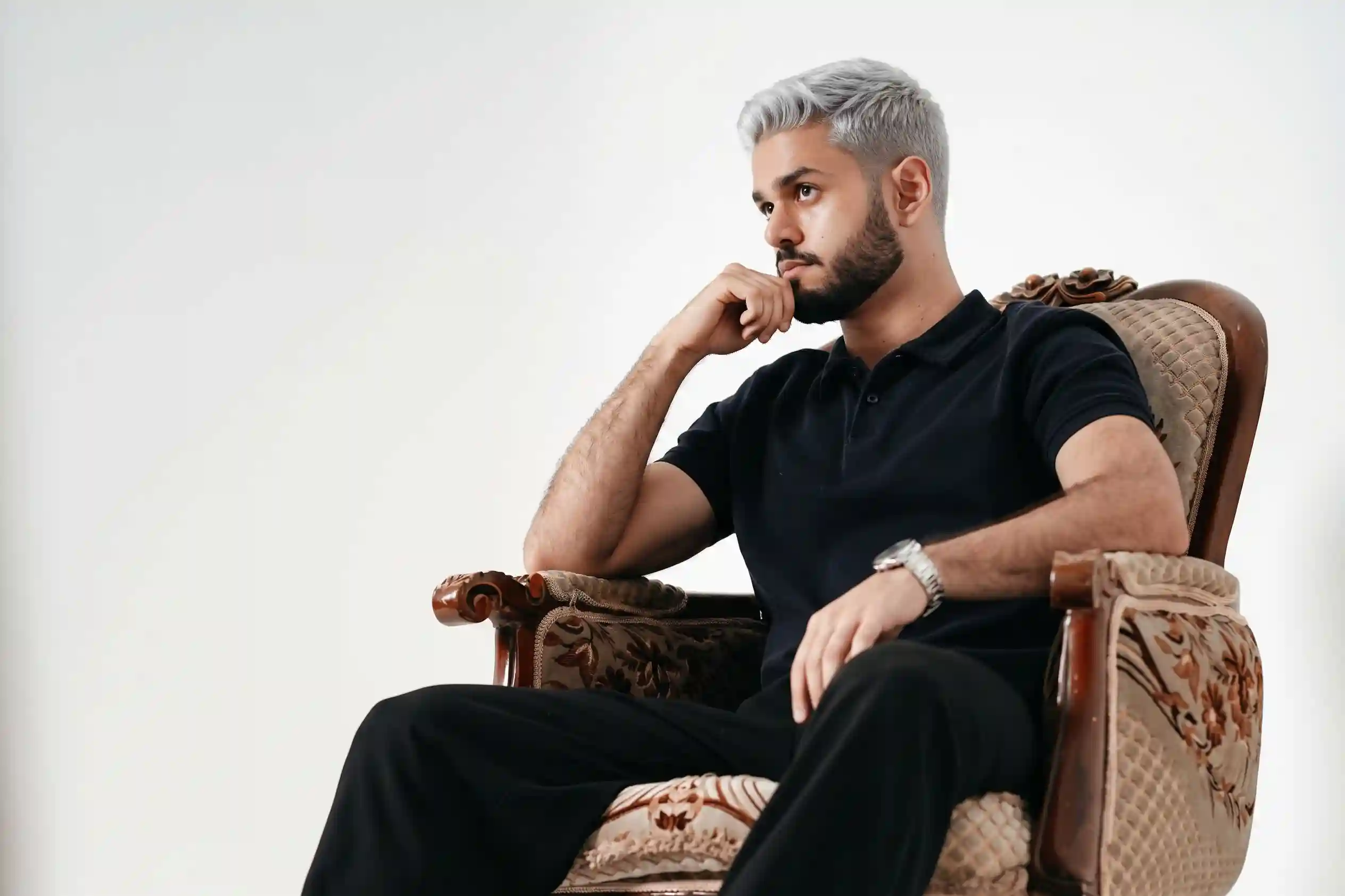
Simulação de cor de cabelo no Gemini: como testar loiro, ruivo e moreno na sua foto antes de pintar
Você está pensando em mudar a cor do cabelo, mas bate aquela insegurança clássica: vai combinar com o meu tom de pele? Vou parecer mais nova ou mais velha? Vai dar certo com a minha sobrancelha? Você já viu gente se arrepender, já viu gente que ficou incrível, mas não sabe em qual grupo você vai cair. E pintar é caro, é demorado e — quando dá errado — a correção pode levar meses.
O custo invisível disso é grande. Uma transformação mal calibrada custa em produto, em tempo no salão e em autoestima. Você passa semanas lidando com um tom que não combina, tentando disfarçar com chapéu, presilha ou cabelo preso — até a próxima ida ao cabeleireiro, que também não é barata. E o pior: com medo de errar, você acaba não mudando nada e continuar na mesma cor por anos.
A boa notícia: o Gemini com o modelo Nano Banana 2 consegue simular a mudança de cor do cabelo na sua própria foto, mantendo os seus traços, a sua pele e o seu formato de rosto intactos. Neste guia, você vai copiar 25 prompts prontos — organizados em loiros, ruivos, morenos, fantasias e técnicas específicas — para testar cada tom antes de marcar o salão.
O Gemini é o assistente de IA multimodal do Google, integrado ao app Gemini, Google Fotos e Google Search. Ele se diferencia por usar o modelo Nano Banana 2 (Gemini 3.1 Flash Image) para edição de imagem por prompt — você anexa a foto do cabelo e ele aplica a nova cor preservando sua identidade. O acesso básico é gratuito no app Gemini (gemini.google.com) com login pelo Google.
A versão atual é o Nano Banana 2, com resolução de 512px a 4K, consistência de identidade para até 5 personagens e 14 objetos de referência, e suporte a múltiplas proporções de tela.
Neste guia: 25 prompts em inglês para simular cor de cabelo na sua foto — organizados em 5 séries temáticas — todos com instrução para usar a foto anexada e preservar seus traços.
Resposta curta:
Para simular cor de cabelo no Gemini, use o Nano Banana 2 com prompts em inglês que começam com “Using the uploaded reference photo” e incluem “preserve the face, skin tone, and body 100% identical — change only the hair color”. Especifique o tom desejado (platinum blonde, honey blonde, auburn red, jet black, ash brown), o subtom (warm, cool, neutral) e o efeito (balayage, highlights, all-over color). Sem essas instruções, a IA muda o rosto inteiro em vez do cabelo.
Como este guia foi montado: Os prompts foram estruturados a partir da documentação oficial do Google para o Nano Banana 2, de referências de coloração publicadas por veículos como Allure, Vogue Beauty, Byrdie e Hair.com, e de boas práticas de consultoria de cor pessoal. Não houve teste próprio da equipe TreinamentosAF com coloristas reais. Os prompts foram escritos em inglês porque o modelo foi treinado com mais dados técnicos de coloração e geração visual nesse idioma.
⚡ TL;DR
- Tempo: 4 min (ou pule pros prompts)
- Nível: Iniciante
- Você vai copiar: 25 prompts + 8 comandos de atalho
- Economia: R$ 300+ em retoque mal calibrado | cor testada antes de pintar
🚀 Navegação rápida:
✨ Este guia é perfeito se você:
Quer ver como ficaria antes de marcar o salão e gastar.
Precisa ver loiro, ruivo ou moreno na sua pele real antes de decidir.
Quer mostrar opções para clientes antes de aplicar a coloração.
🖥️ Primeiro acesso: como simular cor de cabelo no Gemini agora
- Passo 1: Acesse gemini.google.com ou abra o app Gemini no celular.
- Passo 2: Faça login com sua conta Google. O acesso ao Nano Banana 2 é gratuito.
- Passo 3: Tire uma foto sua com o cabelo visível, bem iluminada, de frente ou 3/4. Anexe essa foto.
- Passo 4: Escolha o modelo “Fast” (Nano Banana 2) no menu de modelos.
- Passo 5: Cole um dos 25 prompts abaixo, envie e aguarde o resultado. A imagem é salva como nova cópia.
Índice
- O método dos 4 pilares — por que funciona
- O que você vai conseguir gerar
- Tabela 01: Tipo de mudança × prompt indicado
- Tabela 02: Nano Banana 2 vs Nano Banana Pro
- Tabela 03: Anatomia — o que cada elemento do prompt faz
- 25 prompts prontos — copie e cole
- Amanda aconselha
- Comandos de atalho
- O que o Gemini não consegue fazer
- SOS: a IA mudou o rosto ou a pele
- Erros fatais
- Prompt fraco vs prompt forte
- Glossário rápido
- FAQ
Por que a estrutura do prompt funciona (4 pilares)
Pilar 1: Trava de identidade + trava de mudança única
O erro mais comum é pedir “mude meu cabelo” e ver a IA reconstruir o rosto inteiro. A instrução correta tem duas partes: “preserve the face, skin tone, eyebrows, and body 100% identical — change only the hair color”. Você diz o que NÃO pode mudar (rosto, pele, sobrancelhas) e o que DEVE mudar (cabelo). Sem essa separação, a IA mexe em tudo.
Pilar 2: Tom específico + subtom
“Loiro” é vago. “Platinum blonde with cool undertone”, “honey blonde with warm golden undertone”, “ash blonde with silver undertone” são específicos. O subtom é o que faz a cor combinar ou não com a sua pele. Diga sempre os dois: o tom e o subtom.
Pilar 3: Técnica de coloração
O mesmo tom fica completamente diferente aplicado all-over, em balayage, em highlights ou em ombré. O prompt precisa dizer a técnica: all-over color (cor única), balayage (degradê suave), highlights (mechas), ombre (raiz escura + pontas claras) ou money piece (mechas frontais).
Pilar 4: Prompt em inglês para terminologia de coloração
O Nano Banana 2 foi treinado com muito mais dados de coloração em inglês. Termos como “platinum blonde”, “auburn”, “ash brown”, “balayage”, “cool undertone” ativam o modo de alta fidelidade com muito mais precisão do que a tradução em português. Por isso, todos os prompts deste guia estão em inglês.
O que você vai conseguir gerar com estes prompts
Platinum, honey, ash, golden, balayage — com diferentes subtons.
⏱ 4 min | Nível: Iniciante
Auburn, copper, strawberry, mahogany, ginger — quente ou frio.
⏱ 4 min | Nível: Iniciante
Chocolate, jet black, ash brown, caramel, mocha.
⏱ 3 min | Nível: Iniciante
Tabela 01: Tipo de mudança × prompt indicado
| Tipo de mudança | Série e prompts | Resultado esperado |
|---|---|---|
| Loiros | Série A (A-01 a A-05) | Platinum, honey, ash, golden, balayage |
| Ruivos | Série B (B-01 a B-05) | Auburn, copper, ginger, mahogany, strawberry |
| Morenos | Série C (C-01 a C-05) | Chocolate, jet black, ash, caramel, mocha |
| Cores fantasias | Série D (D-01 a D-05) | Rosa, lilás, azul, verde, pastel |
| Técnicas e efeitos | Série E (E-01 a E-05) | Balayage, ombré, highlights, money piece |
✔️ Até aqui você já sabe: escolher a série certa para o tipo de mudança, entender que tom + subtom + técnica definem o resultado e que toda simulação precisa de trava de identidade.
Tabela 02: Nano Banana 2 vs Nano Banana Pro
| Recurso | Nano Banana 2 (Fast) | Nano Banana Pro (Thinking) |
|---|---|---|
| Acesso | Gratuito no app Gemini | Assinantes Google AI |
| Resolução máxima | 512px a 4K | 2K a 4K |
| Precisão de tom e subtom | Boa | Excelente |
| Preservação de pele e sobrancelha | Alta | Muito alta |
| Velocidade | Flash (segundos) | Mais lento (processamento profundo) |
Tabela 03: Anatomia — o que cada elemento do prompt faz por dentro
| Elemento do prompt | O que você escreve | O que o Gemini entende | Impacto real |
|---|---|---|---|
| Instrução de referência | “Using the uploaded reference photo” | Usar a foto enviada como base | A IA não recria a pessoa |
| Trava de identidade + mudança única | “preserve face, skin, eyebrows; change only hair color” | Alteração isolada do cabelo | Apenas o cabelo muda |
| Tom + subtom | “honey blonde with warm golden undertone” | Cor específica | Resultado preciso |
| Técnica | “all-over color”, “balayage”, “highlights” | Estilo de aplicação | Efeito natural vs chapado |
| Realismo da raiz | “natural root shadow, realistic regrowth” | Aparência de cabelo real | Resultado que parece salão |
💡 O segredo dos especialistas: O que faz a simulação ser convincente é a raiz. Peça “natural root shadow” em qualquer mudança de cor — sem isso, o cabelo parece chapado e a simulação perde credibilidade.
25 prompts prontos para simular cor de cabelo — copie e cole 📌
Os prompts abaixo estão em inglês porque o Nano Banana 2 reconhece terminologia de coloração com muito mais precisão nesse idioma. Cada prompt começa com “Using the uploaded reference photo” — instrução que obriga a IA a usar a foto que você subiu como base, preservando seus traços.
Você lê o cabeçalho em português para escolher o tom e copia o bloco em inglês para colar no Gemini. Substitua o que estiver entre colchetes apenas se quiser personalizar.
👱 Série A — Loiros (A-01 a A-05)
📸 Prompt A-01 — Loiro platinado frio
O que faz: Aplica loiro platinado com subtom frio, mantendo a raiz natural.
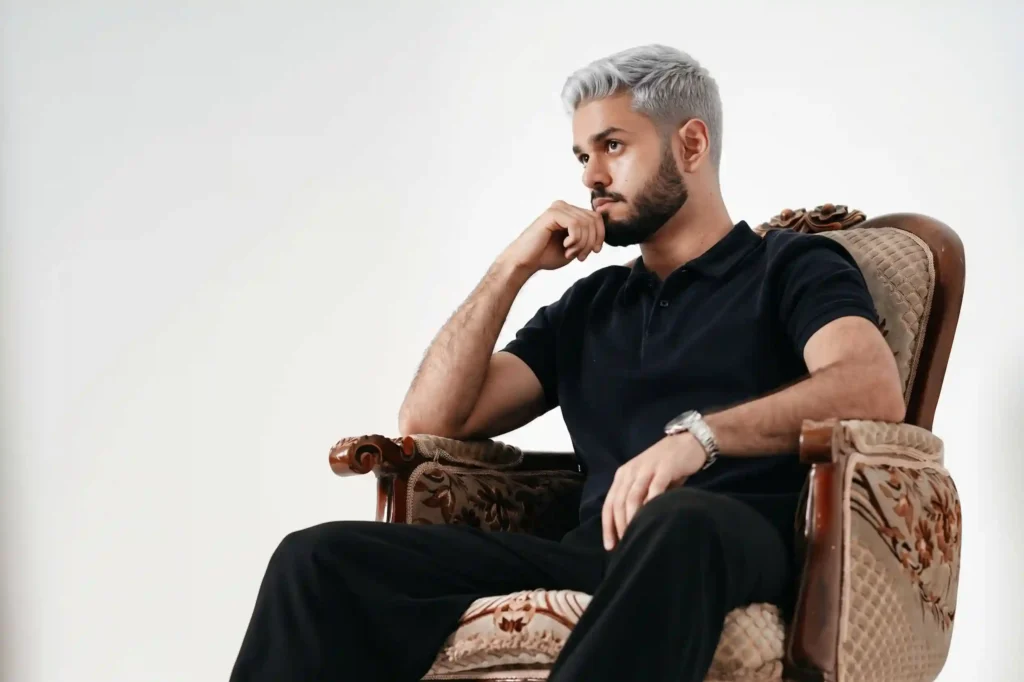
Using the uploaded reference photo, change the person's hair color to platinum blonde with a cool, silvery undertone. Preserve the face, skin tone, eyebrows, and body 100% identical to the reference — do not alter facial features, skin tone, or proportions. Change ONLY the hair color. Add a natural root shadow with slight regrowth for realism. Keep the original hairstyle and length. Photorealistic, salon-quality hair color, natural lighting, 4K.
📸 Prompt A-02 — Loiro mel quente
O que faz: Aplica loiro mel com subtom quente dourado.
Using the uploaded reference photo, change the person's hair color to honey blonde with a warm, golden undertone. Preserve the face, skin tone, eyebrows, and body 100% identical to the reference. Change ONLY the hair color. Add a natural root shadow with slight regrowth for realism. Keep the original hairstyle and length. Photorealistic, salon-quality hair color, warm natural lighting, 4K.
📸 Prompt A-03 — Loiro acinzentado (ash blonde)
O que faz: Aplica loiro com subtom acinzentado, ideal para quem tem pele fria.
Using the uploaded reference photo, change the person's hair color to ash blonde with a cool, grey undertone. Preserve the face, skin tone, eyebrows, and body 100% identical to the reference. Change ONLY the hair color. Add a natural root shadow with slight regrowth for realism. Keep the original hairstyle and length. Photorealistic, salon-quality hair color, neutral lighting, 4K.
📸 Prompt A-04 — Loiro dourado (golden blonde)
O que faz: Aplica loiro dourado vibrante, com subtom amarelo quente.
Using the uploaded reference photo, change the person's hair color to golden blonde with a bright, warm yellow undertone. Preserve the face, skin tone, eyebrows, and body 100% identical to the reference. Change ONLY the hair color. Add a natural root shadow with slight regrowth for realism. Keep the original hairstyle and length. Photorealistic, salon-quality hair color, warm natural lighting, 4K.
📸 Prompt A-05 — Balayage loiro bege
O que faz: Aplica balayage loiro bege, com transição suave da raiz.
Using the uploaded reference photo, change the person's hair color to a beige blonde balayage. Darker natural roots transitioning softly into warm beige blonde ends. Preserve the face, skin tone, eyebrows, and body 100% identical to the reference. Change ONLY the hair color. Keep the original hairstyle and length. Photorealistic, salon-quality balayage, natural lighting, 4K.
Pausa estratégica: Se o rosto mudou, reforce com “preserve the face 100% identical — do not alter facial features, skin tone, or eye color.”
🦰 Série B — Ruivos (B-01 a B-05)
📸 Prompt B-01 — Ruivo acobreado (auburn)
O que faz: Aplica ruivo acobreado profundo, com subtom quente.
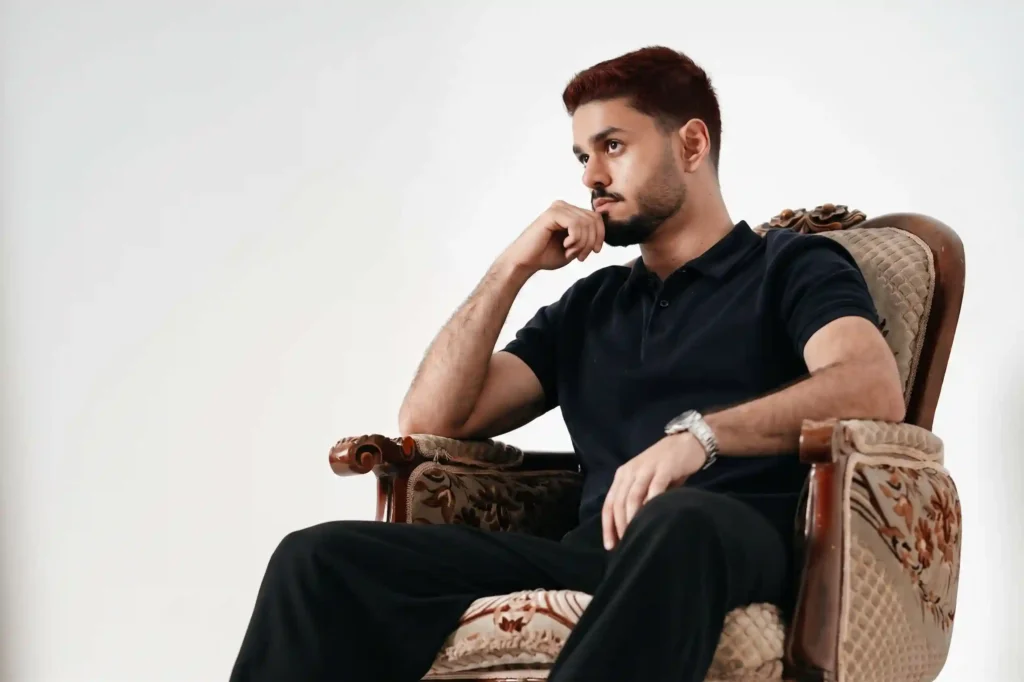
Using the uploaded reference photo, change the person's hair color to auburn — a deep, rich reddish-brown with warm undertones. Preserve the face, skin tone, eyebrows, and body 100% identical to the reference. Change ONLY the hair color. Add a natural root shadow with slight regrowth for realism. Keep the original hairstyle and length. Photorealistic, salon-quality hair color, warm natural lighting, 4K.
📸 Prompt B-02 — Ruivo cobre vibrante
O que faz: Aplica ruivo cobre vibrante, luminoso e quente.
Using the uploaded reference photo, change the person's hair color to vibrant copper red — a bright, warm, orange-toned red. Preserve the face, skin tone, eyebrows, and body 100% identical to the reference. Change ONLY the hair color. Add a natural root shadow with slight regrowth for realism. Keep the original hairstyle and length. Photorealistic, salon-quality hair color, warm golden lighting, 4K.
📸 Prompt B-03 — Ruivo morango (strawberry blonde)
O que faz: Aplica ruivo morango, mistura suave entre loiro e ruivo.
Using the uploaded reference photo, change the person's hair color to strawberry blonde — a soft, warm mix of blonde and light red. Preserve the face, skin tone, eyebrows, and body 100% identical to the reference. Change ONLY the hair color. Add a natural root shadow with slight regrowth for realism. Keep the original hairstyle and length. Photorealistic, salon-quality hair color, warm natural lighting, 4K.
📸 Prompt B-04 — Ruivo acaju (mahogany)
O que faz: Aplica ruivo acaju profundo, com subtom vinho.
Using the uploaded reference photo, change the person's hair color to mahogany — a deep, rich reddish-brown with burgundy undertones. Preserve the face, skin tone, eyebrows, and body 100% identical to the reference. Change ONLY the hair color. Add a natural root shadow with slight regrowth for realism. Keep the original hairstyle and length. Photorealistic, salon-quality hair color, warm natural lighting, 4K.
📸 Prompt B-05 — Ruivo cenoura com mechas
O que faz: Aplica ruivo cenoura com mechas mais claras para dar dimensão.
Using the uploaded reference photo, change the person's hair color to ginger red with subtle lighter copper highlights for dimension. Preserve the face, skin tone, eyebrows, and body 100% identical to the reference. Change ONLY the hair color. Add a natural root shadow with slight regrowth. Keep the original hairstyle and length. Photorealistic, salon-quality hair color, warm golden lighting, 4K.
🔑 Hack avançado: como tornar a simulação mais realista
- Raiz natural é obrigatória: “natural root shadow, slight regrowth” faz a cor parecer recém-feita no salão, não tinta chapada.
- Sobrancelha acompanha: se a mudança for radical, peça “adjust eyebrow color slightly to match the new hair tone — subtle, not exact”.
- Iluminação certa: cabelo quente responde melhor a luz natural dourada; cabelo frio responde melhor a luz neutra.
- Técnica sempre explícita: diga se é all-over, balayage, highlights ou ombré. O mesmo tom muda de efeito completamente.
- Se ficou muito saturado: adicione “reduce the saturation. Make the color look natural, not dyed.”
🤎 Série C — Morenos (C-01 a C-05)
📸 Prompt C-01 — Castanho chocolate
O que faz: Aplica castanho chocolate profundo e brilhante.
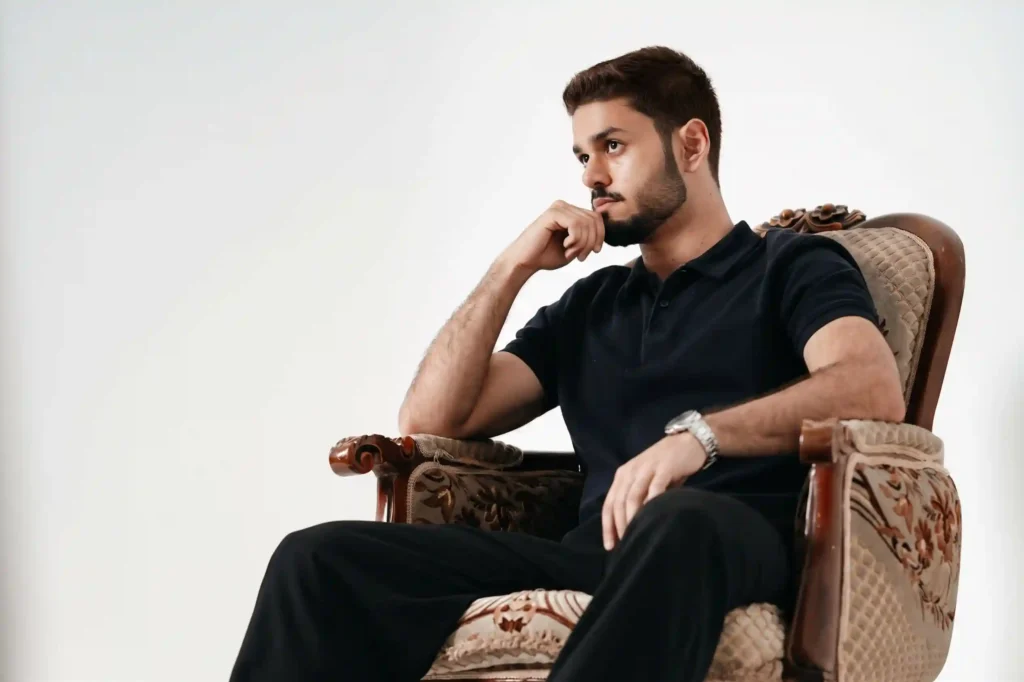
Using the uploaded reference photo, change the person's hair color to chocolate brown — a rich, warm, deep brown. Preserve the face, skin tone, eyebrows, and body 100% identical to the reference. Change ONLY the hair color. Keep the original hairstyle and length. Photorealistic, salon-quality hair color, glossy finish, natural lighting, 4K.
📸 Prompt C-02 — Preto azulado (jet black)
O que faz: Aplica preto profundo com brilho azulado, estilo asiático.
Using the uploaded reference photo, change the person's hair color to jet black with a subtle blue-toned glossy finish. Preserve the face, skin tone, eyebrows, and body 100% identical to the reference. Change ONLY the hair color. Keep the original hairstyle and length. Photorealistic, salon-quality hair color, glossy finish, natural lighting, 4K.
📸 Prompt C-03 — Castanho acinzentado (ash brown)
O que faz: Aplica castanho com subtom frio, discreto e elegante.
Using the uploaded reference photo, change the person's hair color to ash brown — a cool-toned, muted brown with slight grey undertones. Preserve the face, skin tone, eyebrows, and body 100% identical to the reference. Change ONLY the hair color. Keep the original hairstyle and length. Photorealistic, salon-quality hair color, cool natural lighting, 4K.
📸 Prompt C-04 — Castanho caramelo com mechas
O que faz: Aplica castanho caramelo com mechas douradas.
Using the uploaded reference photo, change the person's hair color to caramel brown with subtle golden highlights for dimension. Preserve the face, skin tone, eyebrows, and body 100% identical to the reference. Change ONLY the hair color. Add a natural root shadow. Keep the original hairstyle and length. Photorealistic, salon-quality hair color, warm natural lighting, 4K.
📸 Prompt C-05 — Mocha com balayage
O que faz: Aplica mocha (marrom café) com balayage claro nas pontas.
Using the uploaded reference photo, change the person's hair color to a mocha brown balayage. Deep brown roots transitioning into light caramel ends. Preserve the face, skin tone, eyebrows, and body 100% identical to the reference. Change ONLY the hair color. Keep the original hairstyle and length. Photorealistic, salon-quality balayage, warm natural lighting, 4K.
🌈 Série D — Cores fantasias (D-01 a D-05)
📸 Prompt D-01 — Rosa pastel
O que faz: Aplica rosa pastel suave e sonhador.
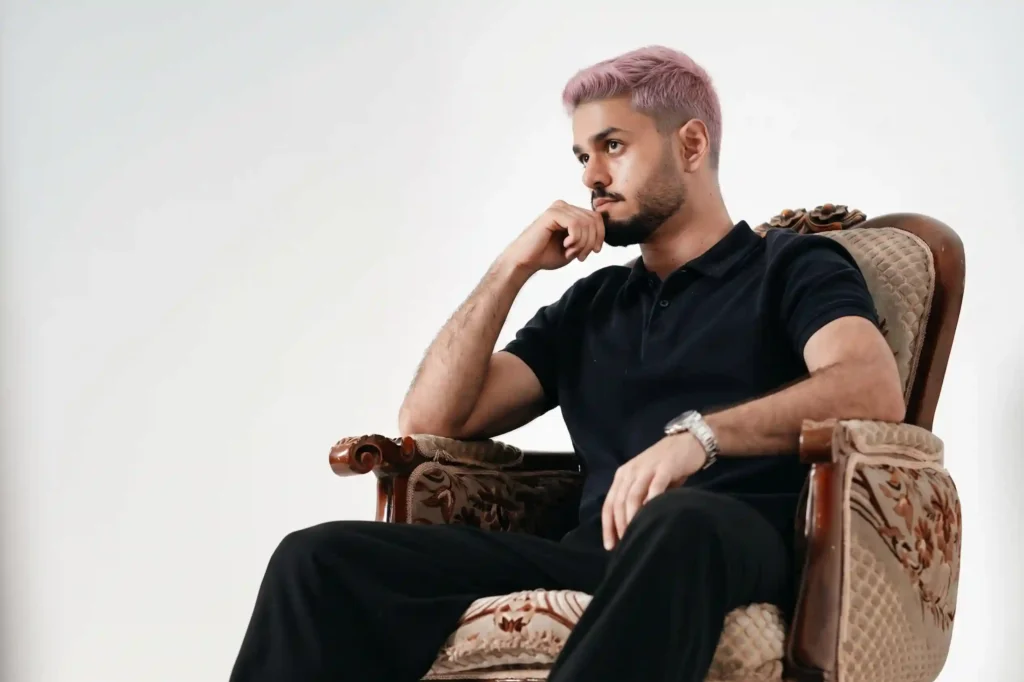
Using the uploaded reference photo, change the person's hair color to soft pastel pink with a cool undertone. Preserve the face, skin tone, eyebrows, and body 100% identical to the reference. Change ONLY the hair color. Add a natural root shadow with slight regrowth. Keep the original hairstyle and length. Photorealistic, salon-quality fantasy hair color, soft natural lighting, 4K.
📸 Prompt D-02 — Lilás pastel
O que faz: Aplica lilás pastel delicado e frio.
Using the uploaded reference photo, change the person's hair color to soft pastel lilac with a cool undertone. Preserve the face, skin tone, eyebrows, and body 100% identical to the reference. Change ONLY the hair color. Add a natural root shadow with slight regrowth. Keep the original hairstyle and length. Photorealistic, salon-quality fantasy hair color, soft natural lighting, 4K.
📸 Prompt D-03 — Azul jeans
O que faz: Aplica azul jeans vibrante mas natural.
Using the uploaded reference photo, change the person's hair color to denim blue — a vibrant but natural blue tone. Preserve the face, skin tone, eyebrows, and body 100% identical to the reference. Change ONLY the hair color. Add a natural root shadow. Keep the original hairstyle and length. Photorealistic, salon-quality fantasy hair color, natural lighting, 4K.
📸 Prompt D-04 — Verde esmeralda
O que faz: Aplica verde esmeralda profundo e elegante.
Using the uploaded reference photo, change the person's hair color to emerald green — a deep, rich jewel-toned green. Preserve the face, skin tone, eyebrows, and body 100% identical to the reference. Change ONLY the hair color. Add a natural root shadow. Keep the original hairstyle and length. Photorealistic, salon-quality fantasy hair color, natural lighting, 4K.
📸 Prompt D-05 — Rosa queimado (rose gold)
O que faz: Aplica rosa queimado metálico, elegante e sutil.
Using the uploaded reference photo, change the person's hair color to rose gold — a metallic blend of soft pink and warm blonde with a subtle sheen. Preserve the face, skin tone, eyebrows, and body 100% identical to the reference. Change ONLY the hair color. Add a natural root shadow. Keep the original hairstyle and length. Photorealistic, salon-quality hair color, warm natural lighting, 4K.
🎨 Série E — Técnicas e efeitos (E-01 a E-05)
📸 Prompt E-01 — Balayage loiro
O que faz: Aplica balayage loiro clássico, com transição suave.
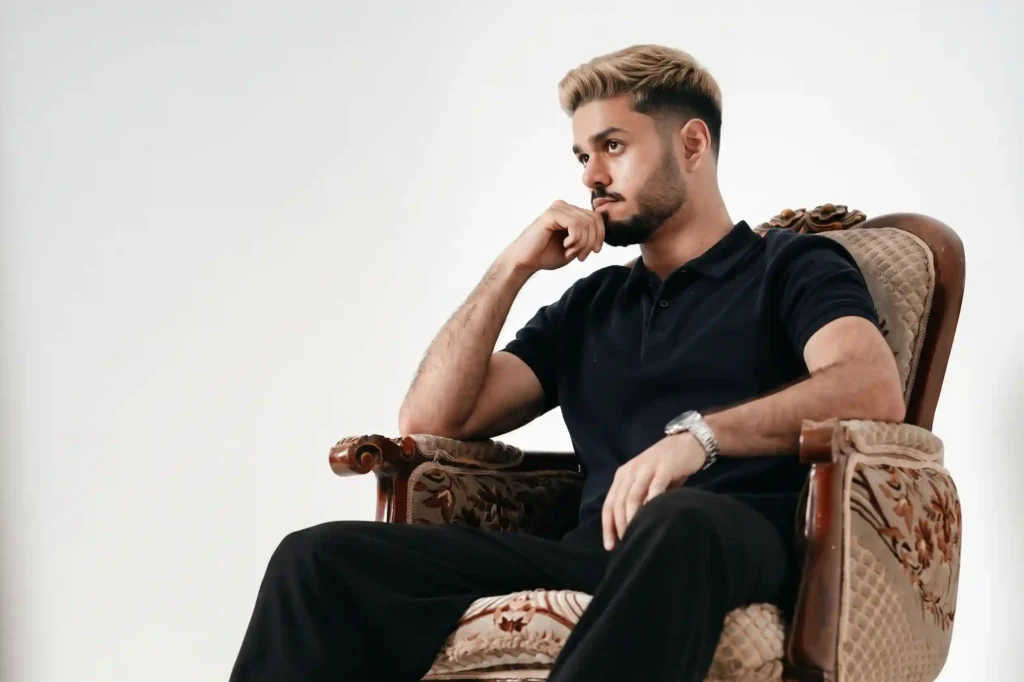
Using the uploaded reference photo, apply a classic blonde balayage — dark natural roots transitioning softly into lighter warm blonde ends. Preserve the face, skin tone, eyebrows, and body 100% identical to the reference. Change ONLY the hair color. Keep the original hairstyle and length. Photorealistic, salon-quality balayage, warm natural lighting, 4K.
📸 Prompt E-02 — Ombré escuro para claro
O que faz: Aplica ombré com raiz escura e pontas claras.
Using the uploaded reference photo, apply an ombré effect — dark natural roots transitioning gradually into much lighter blonde ends. Preserve the face, skin tone, eyebrows, and body 100% identical to the reference. Change ONLY the hair color. Keep the original hairstyle and length. Photorealistic, salon-quality ombré, natural lighting, 4K.
📸 Prompt E-03 — Highlights discretos
O que faz: Aplica highlights sutis, mantendo a cor base.
Using the uploaded reference photo, add subtle golden highlights to the person's hair while keeping the base color close to the original. Preserve the face, skin tone, eyebrows, and body 100% identical to the reference. Change ONLY the hair color. Keep the original hairstyle and length. Photorealistic, salon-quality highlights, natural lighting, 4K.
📸 Prompt E-04 — Money piece (mechas frontais)
O que faz: Aplica mechas frontais mais claras, moldura do rosto.
Using the uploaded reference photo, apply a money piece — the two front sections of hair around the face lightened to blonde while keeping the rest of the hair darker. Preserve the face, skin tone, eyebrows, and body 100% identical to the reference. Change ONLY the hair color. Keep the original hairstyle and length. Photorealistic, salon-quality color, natural lighting, 4K.
📸 Prompt E-05 — Cor fantasia com pontas claras
O que faz: Aplica cor fantasia com transição para loiro nas pontas.
Using the uploaded reference photo, change the person's hair color to a fantasy tone — [COR: pink / purple / blue / green] — with lighter pastel ends. Preserve the face, skin tone, eyebrows, and body 100% identical to the reference. Change ONLY the hair color. Add a natural root shadow with slight regrowth. Keep the original hairstyle and length. Photorealistic, salon-quality fantasy hair color, natural lighting, 4K.
👉 Amanda aconselha:
- Se você tem pele quente: Prefira loiros dourados, mel, ruivos cobre e morenos caramelo. Tons frios podem deixar a pele amarelada.
- Se você tem pele fria: Prefira loiros platinados, acinzentados, ruivos acaju e morenos chocolate. Tons muito quentes podem deixar a pele avermelhada.
- Se você quer algo radical: Use a Série D (fantasias). Teste antes de fazer mechas ou coloração completa.
- Se você quer algo sutil: Use a Série E (técnicas). Balayage e highlights mudam o visual sem alterar radicalmente a identidade.
- Se o rosto mudou: Reenvie com “preserve the face 100% identical — do not alter facial features, skin tone, or eye color.”
- Se a cor ficou saturada demais: Adicione “reduce the saturation. Make it look natural, like a real salon color, not dyed.”
- Se o cabelo pareceu chapado: Adicione “natural root shadow, realistic regrowth, subtle dimension, salon-quality finish.”
Comandos de atalho: o que digitar quando o resultado não saiu certo
| Problema com a resposta | Comando de atalho (copie e envie) | O que acontece |
|---|---|---|
| O rosto mudou | “Preserve the face 100% identical to the reference — do not alter facial features, skin tone, or eye color. Change ONLY the hair color.” | Mantém identidade |
| A pele mudou de tom | “Preserve the exact skin tone from the reference. Do not alter it. Only change the hair color.” | Pele preservada |
| Cabelo ficou chapado | “Add natural root shadow, realistic regrowth, subtle dimension, salon-quality finish.” | Aparência de cabelo real |
| Cor ficou muito saturada | “Reduce the saturation. Make the color look natural, not dyed.” | Cor natural |
| Sobrancelha desalinhada | “Adjust the eyebrow color subtly to match the new hair tone. Do not alter the shape.” | Harmonia entre cabelo e sobrancelha |
| Quero mais opções | “Generate 3 variations with different undertones: warm, cool, and neutral.” | Comparação de subtons |
| Quero outro tom | “Keep the same person, change the hair color to [novo tom].” | Variação de cor sem perder identidade |
| Quero refazer | “Redo the simulation with the correct hair color. Preserve everything else.” | Segunda tentativa |
✔️ Até aqui você já sabe: preservar identidade, manter a pele, dar realismo à raiz e ajustar a sobrancelha — tudo com comandos de uma linha.
O que o Gemini não consegue fazer (e o que usar no lugar)
| O que você pediu | Por que o Gemini falha aqui | O que usar no lugar |
|---|---|---|
| Prever o resultado exato em cabelo real | A IA simula, mas não substitui teste de mecha real | Use a simulação como referência e peça teste de mecha ao colorista |
| Simular reação do cabelo a descoloração real | A IA não sabe o histórico químico do seu cabelo | Use a simulação para escolher o tom e o colorista para calibrar a técnica |
| Avaliar como o cabelo vai reagir a longo prazo | A IA gera aparência visual, não previsão química | Consulte um colorista sobre manutenção e dano |
| Aplicar a cor em várias fotos mantendo consistência | O Gemini edita uma foto por vez | Gere individualmente e organize depois |
A limitação mais importante: o Gemini gera uma aproximação visual realista, não uma garantia de como o cabelo real vai reagir. Use a simulação para escolher a direção — e o colorista para executar.
🚨 SOS: a IA mudou o rosto ou a pele em vez de só o cabelo
- Causa: A trava de identidade não estava clara, ou o prompt pediu uma mudança muito radical de uma vez.
- Correção: Reenvie com o prompt reforçado: “Using the uploaded reference photo, preserve the face, skin tone, eyebrows, and body 100% identical to the reference — do not alter facial features, eye color, or skin tone. Change ONLY the hair color to [tom]. Add natural root shadow. Photorealistic, salon-quality, 4K.”
- Resultado: Apenas o cabelo muda; o rosto e a pele continuam exatamente como na sua foto.
👀 Erros que mais comprometem o resultado
- Erro 1 — “Mude meu cabelo”: A IA recria o rosto inteiro. Correção: Diga “change only the hair color” e “preserve the face 100% identical”.
- Erro 2 — Não especificar tom + subtom: A cor fica aleatória. Correção: Diga “honey blonde with warm golden undertone”, “ash brown with cool undertone”.
- Erro 3 — Não dizer a técnica: A cor fica chapada. Correção: Diga se é all-over, balayage, highlights ou ombré.
- Erro 4 — Esquecer a raiz natural: O cabelo parece tinta de boneca. Correção: Sempre inclua “natural root shadow, slight regrowth”.
- Erro 5 — Traduzir o prompt para português: Termos de coloração funcionam melhor em inglês. Correção: Cole o prompt exatamente como está.
Prompt fraco vs prompt forte — veja a diferença na prática
Este é o erro mais comum com o Gemini: o prompt vago que todo mundo usa — e o prompt específico que entrega resultado real. A diferença não está na ferramenta. Está no que você digita.
Exemplo 01 — Loiro
"Me deixe loira."
Resultado: A IA muda tudo — rosto, pele, expressão. E o loiro sai saturado demais.
"Using the uploaded reference photo, change the person's hair color to honey blonde with a warm, golden undertone. Preserve the face, skin tone, eyebrows, and body 100% identical to the reference. Change ONLY the hair color. Add natural root shadow with slight regrowth. Keep the original hairstyle. Photorealistic, salon-quality, 4K."
Resultado: Você continua sendo você, com loiro mel realista e natural.
Exemplo 02 — Ruivo
"Deixe meu cabelo ruivo."
Resultado: Ruivo saturado tipo cenoura artificial, sem dimensão, cabelo chapado.
"Using the uploaded reference photo, change the person's hair color to auburn — a deep, rich reddish-brown with warm undertones. Preserve the face, skin tone, eyebrows, and body 100% identical. Change ONLY the hair color. Add natural root shadow with slight regrowth. Photorealistic, salon-quality hair color, 4K."
Resultado: Ruivo acobreado profundo, natural e elegante.
Exemplo 03 — Fantasia
"Quero cabelo rosa."
Resultado: Rosa neon, sem nuance, cabelo parecendo peruca.
"Using the uploaded reference photo, change the person's hair color to soft pastel pink with a cool undertone. Preserve the face, skin tone, eyebrows, and body 100% identical. Change ONLY the hair color. Add natural root shadow with slight regrowth. Photorealistic, salon-quality fantasy hair color, 4K."
Resultado: Rosa pastel suave, natural, com aparência de cor feita em salão.
Exemplo 04 — Balayage
"Faça um balayage."
Resultado: Mechas mal distribuídas, sem transição suave, cor chapada nas pontas.
"Using the uploaded reference photo, apply a classic blonde balayage — dark natural roots transitioning softly into lighter warm blonde ends. Preserve the face, skin tone, eyebrows, and body 100% identical. Change ONLY the hair color. Keep the original hairstyle and length. Photorealistic, salon-quality balayage, warm natural lighting, 4K."
Resultado: Transição suave, realista, com efeito de balayage profissional.
Exemplo 05 — Preservação de identidade
"Transforme minha aparência com cabelo novo."
Resultado: A IA muda rosto, pele, formato do rosto — você não se reconhece.
"Using the uploaded reference photo, preserve the face, skin tone, eyebrows, eye color, and body 100% identical to the reference. Change ONLY the hair color to [tom]. Do not alter facial features, expression, or proportions. Add natural root shadow. Photorealistic, salon-quality hair color, 4K."
Resultado: Apenas o cabelo muda — você continua exatamente igual, com a cor nova.
💡 A regra que resume tudo: A IA troca a cor do cabelo — desde que você diga o tom, o subtom, a técnica e preserve tudo o mais. Prompt vago = rosto reconstruído. Prompt específico = simulação realista da cor nova.
Ferramentas além do Gemini: quando usar cada uma
| Ferramenta | Melhor para | Gratuito? | Diferencial real |
|---|---|---|---|
| Gemini (Nano Banana 2) | Simular cor de cabelo na sua foto | Sim | Preserva identidade e permite testar vários tons |
| Apps de coloração virtual | Simulação rápida em tempo real | Parcial | Câmera ao vivo com cor em movimento |
| Colorista profissional | Execução real com diagnóstico capilar | Não | Avalia histórico químico, porosidade e resistência |
| Consulta de coloração pessoal | Identificar subtom ideal para sua pele | Não | Avaliação humana com pano de teste |
Glossário rápido: termos técnicos deste guia
Se algum termo do guia pareceu novo, este glossário resolve em 30 segundos — sem precisar sair da página.
| Termo | O que significa na prática |
|---|---|
| Nano Banana 2 | Modelo de geração e edição de imagem do Gemini (Gemini 3.1 Flash Image). |
| Subtom | Tonalidade secundária da cor — quente (dourada), fria (acinzentada) ou neutra. |
| Balayage | Técnica de coloração que cria transição suave da raiz para as pontas. |
| Money piece | Mechas frontais mais claras que emolduram o rosto. |
| Root shadow | Raiz ligeiramente mais escura que o resto do cabelo, criando aparência natural. |
FAQ: dúvidas reais sendo respondidas 🔍
O Gemini é gratuito para simular cor de cabelo?
Sim. O Nano Banana 2 está disponível gratuitamente no app Gemini. Você pode testar quantos tons quiser sem custo. O Nano Banana Pro, com mais precisão em tom e textura, exige assinatura do Google AI.
Como evitar que o Gemini mude meu rosto?
Comece todo prompt com “Using the uploaded reference photo” e inclua “preserve the face, skin tone, eyebrows, and body 100% identical to the reference — change ONLY the hair color”. Use uma foto de frente, bem iluminada e sem maquiagem pesada. Sem esses cuidados, a IA pode reconstruir os traços.
Preciso escrever o prompt em inglês?
Para simulação de coloração, sim. O Nano Banana 2 foi treinado com mais dados de coloração em inglês. Termos como “honey blonde with warm undertone”, “auburn”, “ash brown”, “balayage” ativam o resultado com muito mais precisão do que a tradução em português.
A simulação substitui o teste de mecha real?
Não. A simulação mostra como o tom pode ficar, mas a execução real depende do histórico químico do seu cabelo, porosidade e resistência. Use a simulação para escolher o tom e sempre peça um teste de mecha ao colorista antes de aplicar a coloração completa.
Posso simular vários tons e comparar?
Sim. Rode o mesmo prompt em fotos diferentes ou mude só a instrução do tom. Você pode gerar 3 variações no mesmo prompt: “Generate 3 variations with different undertones: warm, cool, and neutral.” Isso permite comparar qual subtom combina mais com a sua pele.
Conclusão: a cor que combina com você está a um prompt de distância 🙌
Simular cor de cabelo no Gemini não é sobre ter talento de colorista. É sobre pedir a coisa certa. Os 25 prompts deste guia cobrem os tons mais procurados: loiros, ruivos, morenos, cores fantasias e técnicas específicas. A estrutura por trás deles é sempre a mesma: referência explícita + trava de identidade + trava de mudança única + tom, subtom e técnica.
Com o Nano Banana 2 gratuito, você testa quantos tons quiser antes de marcar o salão e gastar. O ROI está em decidir com segurança, vendo a cor aplicada no seu próprio rosto — em vez de arriscar uma transformação que pode levar meses para corrigir.
O próximo passo é escolher um dos 25 prompts, subir sua foto e testar. Comece pela Série A (loiros) ou pela Série C (morenos) — são as que mais vendem em salão e as que mais geram arrependimento quando mal calibradas.
No fim, a diferença entre uma transformação que dá certo e uma que você precisa corrigir não está no produto. Está em saber, antes de pintar, como a cor fica em você.
Participe da comunidade: Escrevi este guia com a intenção de entregar valor de verdade, da forma mais simples que encontrei. Se ele te ajudou de alguma forma, a melhor maneira de retribuir é compartilhando sua opinião.
Deixe seu comentário: faz sentido? Acha que as dicas valem o teste? Seu feedback me ajuda a criar conteúdos ainda melhores para você. E se você já testou algum prompt, compartilhe seus resultados. Vou amar saber o que você criou :))
📣 Um próximo passo, se fizer sentido para você
Se você ama beleza e quer ir além de prompts prontos — aprender a criar conteúdo com identidade própria a partir do que você ama — o Desafio do Bambu é um espaço para mulheres que querem aprender, viver, criar e continuar.
ps: obgda por chegar até aqui, é importante pra mim.
