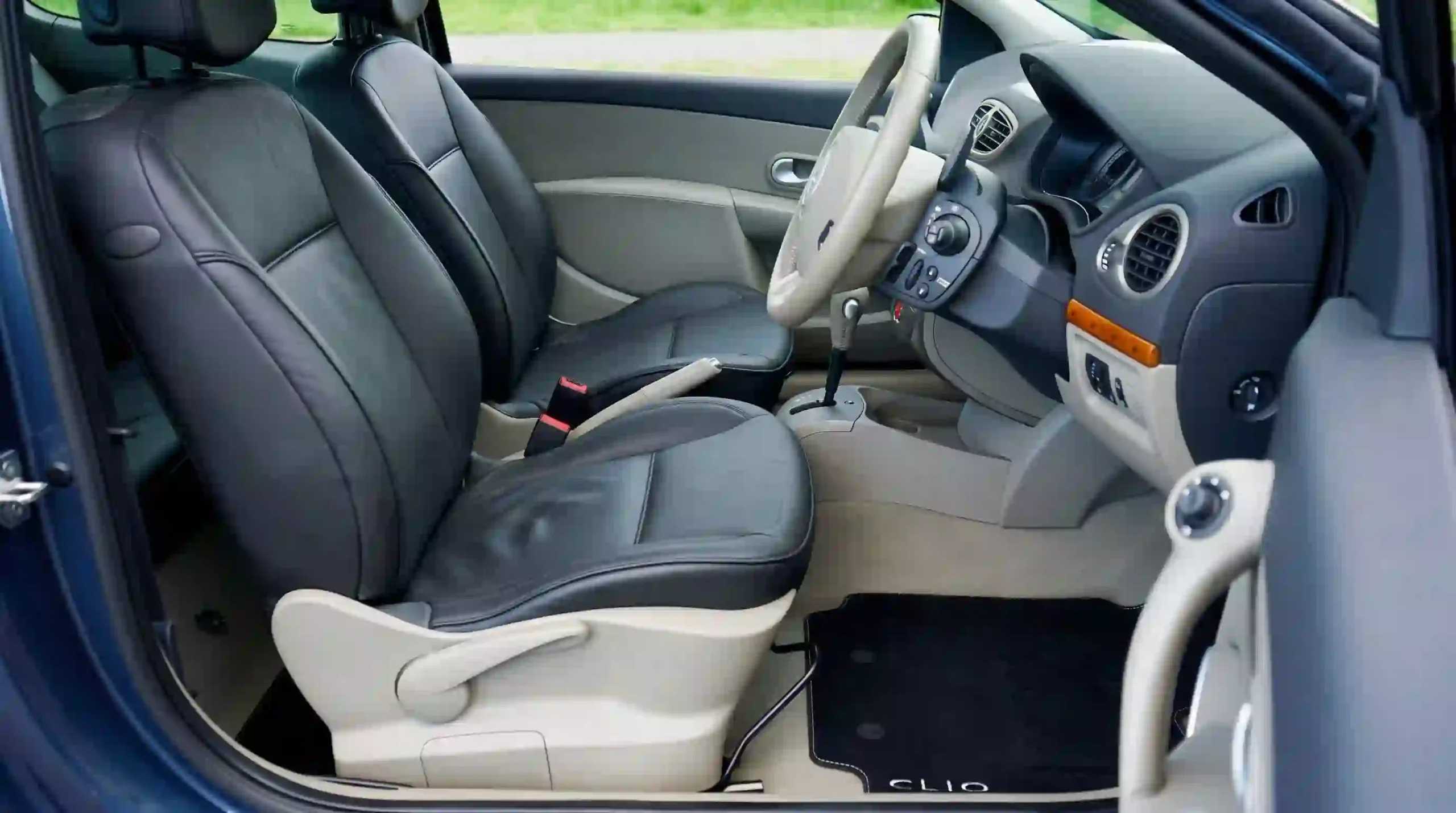
Estofos em pele com IA: fotografe o interior do seu carro e teste novas cores no Gemini
Você olha para o estofado do seu carro e vê potencial. O couro está bom, mas a cor já cansou. Ou você está pensando em comprar um carro usado e quer saber como ficaria com outro tom. Ou o estofado está desgastado e você quer avaliar se vale a pena trocar o revestimento antes de gastar.
O problema é sempre o mesmo: como vai ficar? Trocar o estofado de couro é investimento caro. Um trabalho bem feito dura anos, mas um tom que não combina com o exterior do carro ou com o seu gosto é arrependimento imediato. Você vê fotos de interiores personalizados na internet, mas são de carros diferentes do seu, com painéis diferentes, com iluminação diferente. Você não consegue imaginar como ficaria *no seu carro*.
O custo invisível disso é grande. Você pode gastar em um revestimento que não valoriza o carro, ou em um tom que parece bonito na foto mas não no seu interior. Pode encomendar o serviço e descobrir depois que a cor não era o que você queria. Pode desistir da personalização por medo de errar.
Com o Gemini e o modelo Nano Banana 2, você pode usar a foto do interior do seu carro como **base estrutural** e testar novas cores de estofado. Mas existe uma verdade técnica que a maioria dos tutoriais esconde: **o Gemini não trata a estrutura do seu carro como algo intocável**. A documentação oficial do Google lista “confusão ocasional sobre localização espacial” como limitação do modelo. Na prática, isso significa que ele pode deslocar o volante, mudar a proporção do painel ou alterar o ângulo da câmera sem aviso. Não é uma ferramenta de projeto automotivo. É uma ferramenta de **referência visual de cor e atmosfera**.
Neste guia, você vai copiar 20 prompts organizados em cinco séries: tons neutros, tons quentes, tons frios, tons bicolor e tons premium. Todos usam a foto do interior do seu carro como base estrutural, com lista explícita do que não pode mudar e instrução de alteração localizada apenas no estofado.
O Gemini é o assistente de IA multimodal do Google, disponível em gemini.google.com. Para edição de imagens automotivas, ele usa o modelo Nano Banana 2 (Gemini 3.1 Flash Image). O modelo é capaz de “editar imagens com níveis profissionais de precisão e controle”, mas a documentação oficial também lista limitações de localização espacial. O acesso básico é gratuito com login pela conta Google.
Usuários do Google AI Pro, Plus e Ultra têm acesso ao Nano Banana Pro, com maior consistência e controle criativo.
Neste guia: 20 prompts em inglês para testar novas cores de estofado de couro no Gemini — organizados em 5 séries de tons — todos usando a foto do interior do seu carro como base estrutural.
Resposta curta:
Para testar novas cores de estofado de couro no Gemini usando a foto do interior do seu carro, anexe uma imagem que mostre os bancos e o painel com luz uniforme. Use um prompt que comece com “Use the uploaded image as the structural foundation of the car interior. Do NOT change the dashboard layout, steering wheel position, center console, door panels, window placement, or camera angle.” Depois, especifique a mudança: “Change ONLY the leather seat color to [COR]. Keep the leather texture, stitching pattern, and seat shape exactly as in the original photo.” Finalize com a integração: “Match the lighting direction and color temperature of the original photo. Add realistic reflections on the leather surface consistent with the original material.” Peça “photorealistic, automotive interior photography, 4K”. O resultado será uma referência visual da cor desejada, mas a verificação lado a lado com a foto original é obrigatória, porque o Gemini pode alterar elementos estruturais sem aviso.
Como este guia foi montado: Os prompts foram estruturados a partir da documentação oficial do Google DeepMind sobre o Nano Banana 2 e suas limitações conhecidas (incluindo “confusão ocasional sobre localização espacial”), do guia de prompting do Google Cloud para os modelos Nano Banana, e de padrões públicos de prompting para preservação de estrutura em edições de interiores automotivos. Não houve teste próprio da equipe TreinamentosAF com interiores de carros reais. Os prompts estão em inglês porque o modelo reconhece terminologia de materiais, costura e iluminação automotiva com mais precisão nesse idioma. Importante: o Gemini não é uma ferramenta de projeto automotivo. Para preservação estrutural exata, use o Photoshop com Composition Reference.
⚡ TL;DR
- Tempo: 6 min (ou pule pros prompts)
- Nível: Iniciante
- Você vai copiar: 20 prompts + 7 comandos de atalho
- Benefício: veja como o estofado do seu carro ficaria em outras cores antes de gastar com revestimento
🚀 Navegação rápida:
✨ Este guia é perfeito se você:
Está pensando em revestir os bancos e quer ver antes como fica.
Quer avaliar se o interior combina com você ou se vale trocar.
Quer chegar na oficina sabendo exatamente a cor que busca.
🖥️ Primeiro acesso: como testar a primeira cor agora
- Passo 1: Acesse gemini.google.com ou abra o app Gemini no celular.
- Passo 2: Faça login com sua conta Google. A edição de imagens está disponível no acesso gratuito.
- Passo 3: Fotografe o interior do carro. Ideal: de frente ou três quartos, mostrando os bancos dianteiros e o painel, com luz uniforme, sem sombra pesada.
- Passo 4: Cole um dos 20 prompts abaixo. O Gemini usa a foto como base estrutural e altera apenas a cor do estofado.
- Passo 5: Compare o resultado lado a lado com a foto original. Se a estrutura mudou muito, use os comandos de atalho para reforçar a trava.
Índice
- Por que a estrutura do prompt funciona (4 pilares)
- O que você vai conseguir gerar
- Tabela 01: Tom de couro × prompt indicado
- Tabela 02: Nano Banana 2 vs Nano Banana Pro
- Tabela 03: Anatomia — o que cada elemento do prompt faz
- 20 prompts prontos — copie e cole
- Amanda aconselha
- Comandos de atalho
- O que o Gemini não consegue fazer
- SOS: a estrutura do carro mudou
- Erros fatais
- Prompt fraco vs prompt forte
- Glossário rápido
- FAQ
Por que a estrutura do prompt funciona (4 pilares)
Pilar 1: A foto é a base estrutural — e a lista de “não mude” vem primeiro
O erro mais comum é pedir “muda a cor do estofado” sem delimitar o que não pode mudar. O modelo então decide que pode mover o volante, mudar o painel ou alterar o ângulo. O padrão correto, documentado em prompts de edição automotiva com preservação estrutural, é começar com “Use the uploaded image as the structural foundation of the car interior. Do NOT change the dashboard layout, steering wheel position, center console, door panels, window placement, or camera angle.” Cada item nomeado vira uma restrição que o modelo tenta respeitar. Quanto mais específica a lista, menor a chance de erro — mas nunca zero.
Pilar 2: Alteração localizada apenas no estofado
O prompt precisa isolar a mudança: “Change ONLY the leather seat color to [COR]. Keep the leather texture, stitching pattern, and seat shape exactly as in the original photo.” A palavra “only” é crítica. Sem ela, o modelo pode alterar painel, volante ou carpete junto. A instrução também precisa preservar a textura do couro e o padrão de costura, porque são esses detalhes que mantêm o resultado realista. Um couro liso e sem costura parece plástico.
Pilar 3: Integração de luz e reflexo no couro
A diferença entre uma referência útil e uma “montagem amadora” está na integração. O prompt precisa dizer: “Match the lighting direction and color temperature of the original photo. Add realistic reflections on the leather surface consistent with the original material.” Couro tem brilho característico que muda com a cor. Um couro preto reflete de um jeito, um couro caramelo reflete de outro. Sem essa instrução, a cor parece pintada por cima, sem profundidade.
Pilar 4: Prompt em inglês para terminologia automotiva e de materiais
O Nano Banana 2 reconhece termos de geometria automotiva, texturas de couro e iluminação com mais precisão em inglês. Palavras como “dashboard layout”, “steering wheel position”, “center console”, “stitching pattern”, “leather texture” ativam referências mais específicas do que traduções literais. O Google recomenda usar linguagem natural e descritiva, com verbos fortes e detalhes concretos. Por isso, todos os prompts deste guia estão em inglês.
📊 Na prática: A diferença entre “a imagem parece o meu carro” e “a imagem é uma montagem” está em três detalhes: a lista de proibições vem antes da mudança de cor, a alteração é isolada apenas no estofado, e a luz/reflexo é explicitamente integrada. Os prompts das Séries A e E priorizam exatamente esses três pontos.
O que você vai conseguir gerar com estes prompts
Preto, cinza, caramelo, marrom, bege.
⏱ 5 min | Nível: Iniciante
Vinho, azul, verde, combinações de duas cores.
⏱ 6 min | Nível: Intermediário
Couro perfurado, costura contrastante, tons sofisticados.
⏱ 6 min | Nível: Intermediário
Tabela 01: Tom de couro × prompt indicado
| Tom | Série e prompts | Resultado esperado |
|---|---|---|
| Neutros | Série A (A-01 a A-04) | Preto, cinza, bege — atemporal e discreto |
| Quentes | Série B (B-01 a B-04) | Caramelo, marrom, cobre — aconchego e sofisticação |
| Frios | Série C (C-01 a C-04) | Vinho, azul, verde — personalidade e ousadia |
| Bicolor | Série D (D-01 a D-04) | Duas cores no mesmo interior, contraste controlado |
| Premium | Série E (E-01 a E-04) | Perfuração, costura contrastante, tons sofisticados |
✔️ Até aqui você já sabe: escolher a família de tom certa para o seu objetivo, entender que a foto é base estrutural (não referência de estilo), e que a lista de proibições precisa vir antes da mudança de cor.
Tabela 02: Nano Banana 2 vs Nano Banana Pro
| Recurso | Nano Banana 2 (Fast) | Nano Banana Pro |
|---|---|---|
| Acesso | Gratuito no app Gemini | Assinantes Google AI |
| Controle de cena automotiva | Bom | Excelente |
| Textura de couro e reflexos | Bom | Excelente |
| Velocidade | Flash (segundos) | Mais lento |
Tabela 03: Anatomia — o que cada elemento do prompt faz por dentro
| Elemento do prompt | O que você escreve | O que o Gemini entende | Impacto real |
|---|---|---|---|
| Base estrutural | “Use the uploaded image as the structural foundation of the car interior” | A foto é o ponto de partida obrigatório | O modelo não inventa um interior novo |
| Lista de proibições | “Do NOT change the dashboard layout, steering wheel position, center console, door panels, window placement, or camera angle” | Lista fechada de elementos intocáveis | Reduz (não elimina) o erro de geometria |
| Mudança isolada | “Change ONLY the leather seat color to [COR]” | A cor do estofado é a única variável | Painel, volante e carpete intactos |
| Preservação de textura | “Keep the leather texture, stitching pattern, and seat shape exactly as in the original photo” | Textura e costura originais mantidas | O couro não parece plástico liso |
| Integração de reflexo | “Add realistic reflections on the leather surface consistent with the original material” | Brilho do couro coerente com a cor nova | A cor tem profundidade, não é chapada |
| Qualidade | “Photorealistic, automotive interior photography, 4K” | Acabamento profissional | Referência pronta para usar |
💡 O segredo dos especialistas: Teste de cor de estofado funciona quando a lista de proibições vem primeiro, a mudança é isolada no couro, e o reflexo é integrado. Mesmo assim, o Gemini pode errar a geometria do painel — a verificação lado a lado com a foto original não é opcional.
20 prompts prontos para testar cores de estofado — copie e cole 📌
Os prompts abaixo estão em inglês porque o Nano Banana 2 reconhece terminologia de geometria automotiva, texturas de couro e iluminação com mais precisão nesse idioma. Cada prompt começa com a mesma estrutura de três partes: base estrutural, lista de proibições, e mudança isolada com integração de reflexo. O que muda entre eles é apenas a cor desejada e o tipo de acabamento.
Você lê o cabeçalho em português para escolher o tom e copia o bloco em inglês para colar no Gemini. Substitua o que estiver entre colchetes apenas se quiser personalizar a cor ou o acabamento.
☕ Série A — Tons neutros (A-01 a A-04)
📸 Prompt A-01 — Preto clássico
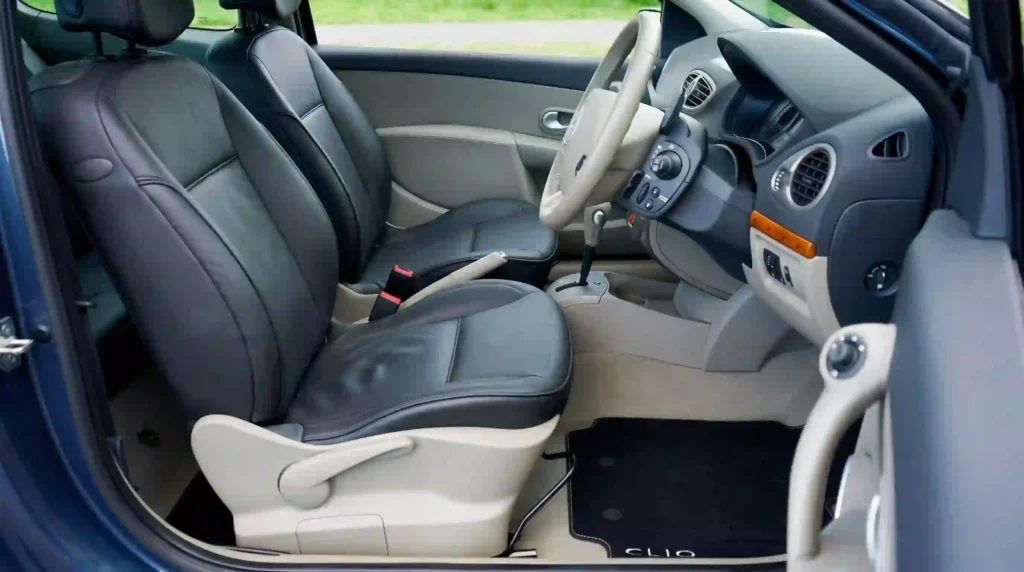
Use the uploaded image as the structural foundation of the car interior. Do NOT change the dashboard layout, steering wheel position, center console, door panels, window placement, or camera angle. Preserve the original lighting direction and color temperature.

Change ONLY the leather seat color to classic black. Keep the leather texture, stitching pattern, and seat shape exactly as in the original photo.

Integrate: Add realistic reflections on the leather surface consistent with a matte black finish. The leather should look soft and slightly absorbent, not glossy.

Output: photorealistic, automotive interior photography, 4K.
📸 Prompt A-02 — Cinza grafite
Use the uploaded image as the structural foundation of the car interior. Do NOT change the dashboard layout, steering wheel position, center console, door panels, window placement, or camera angle. Preserve the original lighting direction and color temperature.

Change ONLY the leather seat color to graphite grey. Keep the leather texture, stitching pattern, and seat shape exactly as in the original photo.

Integrate: Add realistic reflections on the leather surface consistent with a semi-gloss grey finish. The grey should read as cool and modern, not warm.

Output: photorealistic, automotive interior photography, 4K.
📸 Prompt A-03 — Bege areia
Use the uploaded image as the structural foundation of the car interior. Do NOT change the dashboard layout, steering wheel position, center console, door panels, window placement, or camera angle. Preserve the original lighting direction and color temperature.

Change ONLY the leather seat color to sand beige. Keep the leather texture, stitching pattern, and seat shape exactly as in the original photo.

Integrate: Add realistic reflections on the leather surface consistent with a soft matte beige finish. The color should feel warm and neutral, not yellow.

Output: photorealistic, automotive interior photography, 4K.
📸 Prompt A-04 — Cinza claro
Use the uploaded image as the structural foundation of the car interior. Do NOT change the dashboard layout, steering wheel position, center console, door panels, window placement, or camera angle. Preserve the original lighting direction and color temperature.

Change ONLY the leather seat color to light grey. Keep the leather texture, stitching pattern, and seat shape exactly as in the original photo.

Integrate: Add realistic reflections on the leather surface consistent with a soft matte light grey finish. The color should feel airy and modern.

Output: photorealistic, automotive interior photography, 4K.
Pausa estratégica: Se o Gemini deslocou o volante ou mudou o painel, reenvie com a lista de proibições ainda mais específica: “Do NOT move the steering wheel. Do NOT change the dashboard shape. Do NOT alter the center console layout.” Cada item nomeado reduz a chance de erro — mas não elimina. Verifique sempre lado a lado.
🪵 Série B — Tons quentes (B-01 a B-04)
📸 Prompt B-01 — Caramelo
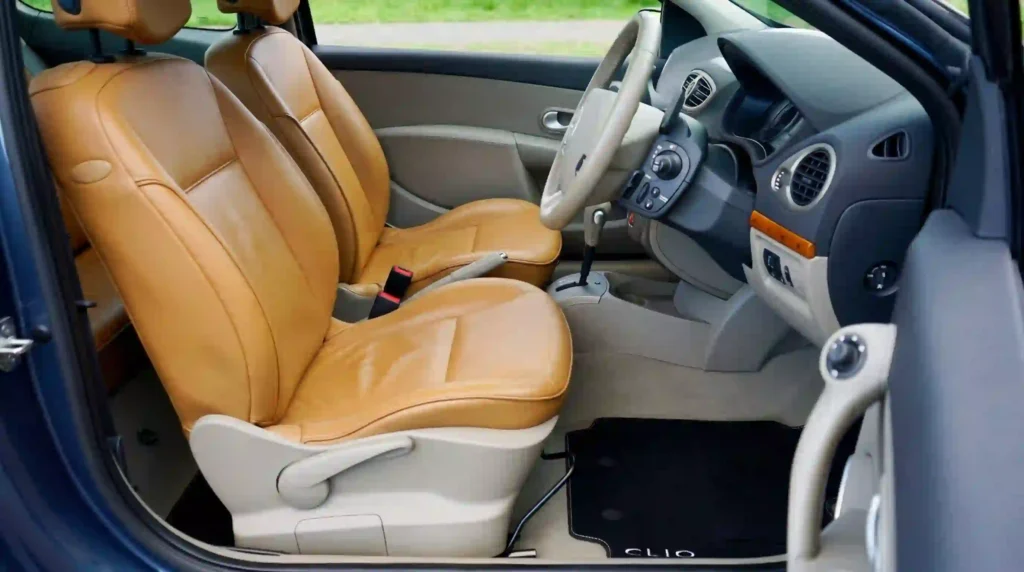
Use the uploaded image as the structural foundation of the car interior. Do NOT change the dashboard layout, steering wheel position, center console, door panels, window placement, or camera angle. Preserve the original lighting direction and color temperature.

Change ONLY the leather seat color to warm caramel. Keep the leather texture, stitching pattern, and seat shape exactly as in the original photo.

Integrate: Add realistic reflections on the leather surface consistent with a semi-gloss caramel finish. The color should feel rich and warm, with golden undertones.

Output: photorealistic, automotive interior photography, 4K.
📸 Prompt B-02 — Marrom cacau
Use the uploaded image as the structural foundation of the car interior. Do NOT change the dashboard layout, steering wheel position, center console, door panels, window placement, or camera angle. Preserve the original lighting direction and color temperature.

Change ONLY the leather seat color to cocoa brown. Keep the leather texture, stitching pattern, and seat shape exactly as in the original photo.

Integrate: Add realistic reflections on the leather surface consistent with a matte cocoa finish. The color should feel deep and earthy, not reddish.

Output: photorealistic, automotive interior photography, 4K.
📸 Prompt B-03 — Cobre
Use the uploaded image as the structural foundation of the car interior. Do NOT change the dashboard layout, steering wheel position, center console, door panels, window placement, or camera angle. Preserve the original lighting direction and color temperature.

Change ONLY the leather seat color to copper. Keep the leather texture, stitching pattern, and seat shape exactly as in the original photo.

Integrate: Add realistic reflections on the leather surface consistent with a semi-gloss copper finish. The color should feel metallic and warm, with subtle orange undertones.

Output: photorealistic, automotive interior photography, 4K.
📸 Prompt B-04 — Areia escura
Use the uploaded image as the structural foundation of the car interior. Do NOT change the dashboard layout, steering wheel position, center console, door panels, window placement, or camera angle. Preserve the original lighting direction and color temperature.

Change ONLY the leather seat color to dark sand. Keep the leather texture, stitching pattern, and seat shape exactly as in the original photo.

Integrate: Add realistic reflections on the leather surface consistent with a matte dark sand finish. The color should feel muted and sophisticated, not bright.

Output: photorealistic, automotive interior photography, 4K.
🍷 Série C — Tons frios (C-01 a C-04)
📸 Prompt C-01 — Vinho
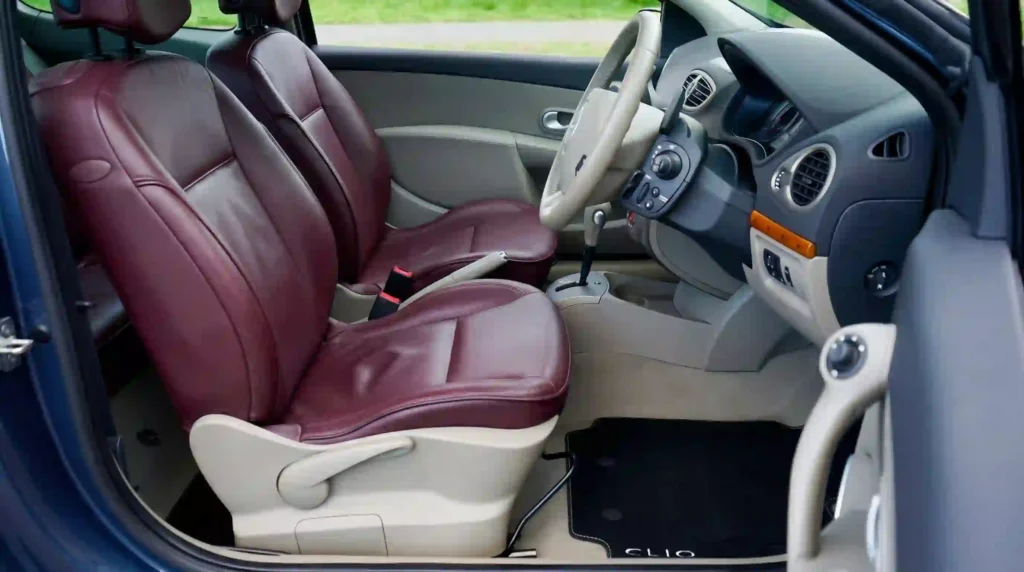
Use the uploaded image as the structural foundation of the car interior. Do NOT change the dashboard layout, steering wheel position, center console, door panels, window placement, or camera angle. Preserve the original lighting direction and color temperature.

Change ONLY the leather seat color to deep wine red. Keep the leather texture, stitching pattern, and seat shape exactly as in the original photo.

Integrate: Add realistic reflections on the leather surface consistent with a semi-gloss wine finish. The color should feel rich and dark, with cool undertones.

Output: photorealistic, automotive interior photography, 4K.
📸 Prompt C-02 — Azul meia-noite
Use the uploaded image as the structural foundation of the car interior. Do NOT change the dashboard layout, steering wheel position, center console, door panels, window placement, or camera angle. Preserve the original lighting direction and color temperature.

Change ONLY the leather seat color to midnight blue. Keep the leather texture, stitching pattern, and seat shape exactly as in the original photo.

Integrate: Add realistic reflections on the leather surface consistent with a matte midnight blue finish. The color should feel deep and cool, almost black in shadow.

Output: photorealistic, automotive interior photography, 4K.
📸 Prompt C-03 — Verde floresta
Use the uploaded image as the structural foundation of the car interior. Do NOT change the dashboard layout, steering wheel position, center console, door panels, window placement, or camera angle. Preserve the original lighting direction and color temperature.

Change ONLY the leather seat color to forest green. Keep the leather texture, stitching pattern, and seat shape exactly as in the original photo.

Integrate: Add realistic reflections on the leather surface consistent with a semi-gloss forest green finish. The color should feel natural and sophisticated, not neon.

Output: photorealistic, automotive interior photography, 4K.
📸 Prompt C-04 — Cinza azulado
Use the uploaded image as the structural foundation of the car interior. Do NOT change the dashboard layout, steering wheel position, center console, door panels, window placement, or camera angle. Preserve the original lighting direction and color temperature.

Change ONLY the leather seat color to slate blue-grey. Keep the leather texture, stitching pattern, and seat shape exactly as in the original photo.

Integrate: Add realistic reflections on the leather surface consistent with a matte slate finish. The color should feel cool and understated, with blue undertones.

Output: photorealistic, automotive interior photography, 4K.
🎨 Série D — Bicolor (D-01 a D-04)
📸 Prompt D-01 — Preto e caramelo
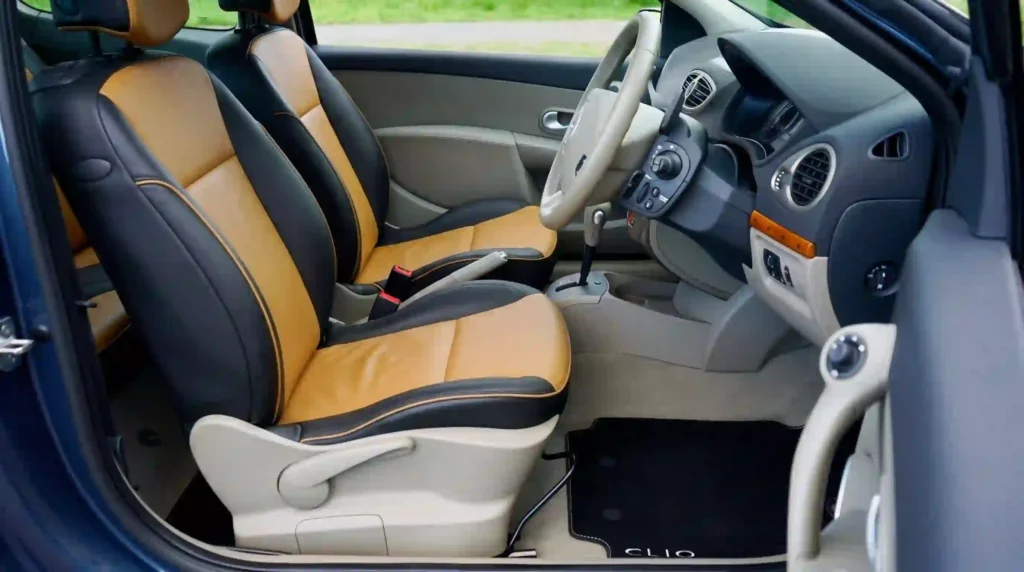
Use the uploaded image as the structural foundation of the car interior. Do NOT change the dashboard layout, steering wheel position, center console, door panels, window placement, or camera angle. Preserve the original lighting direction and color temperature.

Change ONLY the leather seat colors to a two-tone scheme: black on the outer bolsters and caramel on the center panels. Keep the leather texture, stitching pattern, and seat shape exactly as in the original photo.

Integrate: Add realistic reflections on both leather surfaces. The transition between black and caramel should follow the original seat panel seams.

Output: photorealistic, automotive interior photography, 4K.
📸 Prompt D-02 — Cinza e bege
Use the uploaded image as the structural foundation of the car interior. Do NOT change the dashboard layout, steering wheel position, center console, door panels, window placement, or camera angle. Preserve the original lighting direction and color temperature.

Change ONLY the leather seat colors to a two-tone scheme: graphite grey on the outer bolsters and sand beige on the center panels. Keep the leather texture, stitching pattern, and seat shape exactly as in the original photo.

Integrate: Add realistic reflections on both leather surfaces. The contrast should be subtle and sophisticated.

Output: photorealistic, automotive interior photography, 4K.
📸 Prompt D-03 — Preto e vinho
Use the uploaded image as the structural foundation of the car interior. Do NOT change the dashboard layout, steering wheel position, center console, door panels, window placement, or camera angle. Preserve the original lighting direction and color temperature.

Change ONLY the leather seat colors to a two-tone scheme: black on the outer bolsters and deep wine on the center panels. Keep the leather texture, stitching pattern, and seat shape exactly as in the original photo.

Integrate: Add realistic reflections on both leather surfaces. The wine should read as rich and dark against the black.

Output: photorealistic, automotive interior photography, 4K.
📸 Prompt D-04 — Marrom e areia
Use the uploaded image as the structural foundation of the car interior. Do NOT change the dashboard layout, steering wheel position, center console, door panels, window placement, or camera angle. Preserve the original lighting direction and color temperature.

Change ONLY the leather seat colors to a two-tone scheme: cocoa brown on the outer bolsters and sand beige on the center panels. Keep the leather texture, stitching pattern, and seat shape exactly as in the original photo.

Integrate: Add realistic reflections on both leather surfaces. The warm tones should feel cohesive and earthy.

Output: photorealistic, automotive interior photography, 4K.
✨ Série E — Premium (E-01 a E-04)
📸 Prompt E-01 — Preto perfurado com costura contrastante
Use the uploaded image as the structural foundation of the car interior. Do NOT change the dashboard layout, steering wheel position, center console, door panels, window placement, or camera angle. Preserve the original lighting direction and color temperature.

Change ONLY the leather seat color to black with perforated center panels and contrast stitching in light grey. Keep the seat shape exactly as in the original photo.

Integrate: Add realistic reflections on the perforated leather. The perforations should cast tiny shadows, and the contrast stitching should be visible but subtle.

Output: photorealistic, automotive interior photography, 4K.
📸 Prompt E-02 — Caramelo com costura tom sobre tom
Use the uploaded image as the structural foundation of the car interior. Do NOT change the dashboard layout, steering wheel position, center console, door panels, window placement, or camera angle. Preserve the original lighting direction and color temperature.

Change ONLY the leather seat color to caramel with tonal stitching (slightly darker than the leather). Keep the leather texture and seat shape exactly as in the original photo.

Integrate: Add realistic reflections on the semi-gloss caramel leather. The stitching should be subtle and blend with the leather, not contrast.

Output: photorealistic, automotive interior photography, 4K.
📸 Prompt E-03 — Vinho com costura creme
Use the uploaded image as the structural foundation of the car interior. Do NOT change the dashboard layout, steering wheel position, center console, door panels, window placement, or camera angle. Preserve the original lighting direction and color temperature.

Change ONLY the leather seat color to deep wine with contrast stitching in cream. Keep the leather texture and seat shape exactly as in the original photo.

Integrate: Add realistic reflections on the semi-gloss wine leather. The cream stitching should stand out clearly against the dark wine.

Output: photorealistic, automotive interior photography, 4K.
📸 Prompt E-04 — Cinza com perfuração e costura vermelha
Use the uploaded image as the structural foundation of the car interior. Do NOT change the dashboard layout, steering wheel position, center console, door panels, window placement, or camera angle. Preserve the original lighting direction and color temperature.

Change ONLY the leather seat color to graphite grey with perforated center panels and contrast stitching in deep red. Keep the seat shape exactly as in the original photo.

Integrate: Add realistic reflections on the perforated leather. The red stitching should be visible but not overwhelming. The perforations should cast subtle shadows.

Output: photorealistic, automotive interior photography, 4K.
👉 Amanda aconselha:
- Se você quer algo atemporal: Comece pela Série A (neutros). Preto e cinza nunca saem de moda e valorizam qualquer carro.
- Se você quer aconchego: A Série B (quentes) entrega caramelo, marrom e cobre com sofisticação.
- Se você quer personalidade: A Série C (frios) traz vinho, azul e verde para quem não tem medo de cor.
- Se você quer contraste sem exagero: A Série D (bicolor) combina duas cores no mesmo interior.
- Se você quer algo premium: A Série E entrega perfuração, costura contrastante e acabamento sofisticado.
- Se a imagem gerada não parece o seu carro: Verifique se o prompt começa com a lista de proibições. Se o volante mudou de lugar, adicione “Do NOT move the steering wheel. Do NOT change the dashboard shape.”
- Se você precisa da estrutura exata: O Gemini não é a ferramenta para isso. Use o Photoshop com Composition Reference, que preserva o layout original.
Comandos de atalho: o que digitar quando o resultado não saiu certo
| Problema com a resposta | Comando de atalho (copie e envie) | O que acontece |
|---|---|---|
| O volante mudou de lugar | “Do NOT move the steering wheel. Restore the steering wheel to its original position from the uploaded photo.” | Trava específica para o volante |
| O painel mudou de forma ou proporção | “Do NOT change the dashboard shape or proportions. Keep the original dashboard exactly as in the uploaded photo.” | Trava específica para o painel |
| O couro ficou chapado, sem reflexo | “Add realistic leather reflections and depth. The leather should look soft and textured, not painted.” | Reflexo e profundidade no couro |
| Quero trocar a cor de novo | “Change the leather seat color to [NOVA COR], keep the same position and texture.” | Nova cor sem alterar o resto |
| Quero ver a costura em outra cor | “Change the stitching color to [COR], keep the leather color and seat shape.” | Costura ajustada |
| Quero formato vertical | “Reframe as a vertical 9:16 image, keeping the same interior layout and seat positions.” | Formato para stories, mantendo a estrutura |
| Quero comparar duas cores lado a lado | “Generate a side-by-side comparison: left side black leather, right side caramel leather, same car interior.” | Comparação direta de tons |
✔️ Até aqui você já sabe: travar volante, travar painel, adicionar reflexo no couro, trocar cor, trocar costura, mudar formato e comparar tons — tudo com comandos de uma linha.
O que o Gemini não consegue fazer (e o que usar no lugar)
| O que você pediu | Por que o Gemini falha aqui | O que usar no lugar |
|---|---|---|
| Manter a estrutura exata do interior (volante, painel, console) | A documentação oficial lista “confusão ocasional sobre localização espacial” como limitação | Use o Photoshop com Composition Reference, que preserva o layout original |
| Garantir que a cor real do couro vai ficar igual à simulação | A IA gera uma versão idealizada, sem considerar tingimento real, iluminação do carro ou desgaste | Use a simulação como referência e peça amostras de couro ao tapeceiro |
| Simular o custo do revestimento | A IA não calcula orçamentos | Use a simulação como referência e peça orçamento ao tapeceiro |
| Evitar bloqueio por filtro de segurança se a foto tiver pessoas | O Gemini bloqueia edições que envolvem rostos não permitidos | Use uma foto do interior sem pessoas, ou cubra rostos antes de anexar |
Em resumo: o Gemini entrega uma referência visual de cor e atmosfera, não um projeto de revestimento. Ele não substitui a amostra real de couro, não mantém a estrutura exata do interior e pode bloquear se houver pessoas na foto. A função é visual e aspiracional — e é exatamente aí que ele se torna útil para a decisão.
🚨 SOS: a estrutura do carro mudou
- Causa: O Gemini tem limitações documentadas de localização espacial. A lista de proibições reduz o erro, mas não elimina.
- Correção: Reenvie com a lista de proibições ainda mais específica: “Do NOT move the steering wheel. Do NOT change the dashboard shape. Do NOT alter the center console layout. Do NOT change the camera angle. Keep the original car interior architecture exactly as in the uploaded photo.”
- Resultado: A estrutura fica mais próxima da original, mas a verificação lado a lado continua obrigatória.
- Se a estrutura continuar mudando: O Gemini não é a ferramenta para preservação estrutural exata. Use o Photoshop com Composition Reference, que foi projetado para isso.
👀 Erros que mais comprometem o resultado
- Erro 1 — Não colocar a lista de proibições no início: O modelo trata a foto como ponto de partida, não como restrição. Correção: Comece com “Do NOT change the dashboard layout, steering wheel position, center console, door panels, window placement, or camera angle.”
- Erro 2 — Não isolar a mudança apenas no estofado: O modelo altera painel, volante ou carpete junto. Correção: Use “Change ONLY the leather seat color to [COR]. Keep the leather texture, stitching pattern, and seat shape exactly as in the original photo.”
- Erro 3 — Esquecer o reflexo do couro: A cor fica chapada, parece plástico. Correção: Inclua “Add realistic reflections on the leather surface consistent with the original material.”
- Erro 4 — Foto de referência sem luz visível: A imagem gerada fica sem relação com o seu interior. Correção: Use uma foto com luz uniforme, mostrando os bancos e o painel.
- Erro 5 — Ignorar a limitação de localização espacial: A estrutura muda e você não percebe. Correção: Compare sempre lado a lado com a foto original antes de usar a referência.
Prompt fraco vs prompt forte — veja a diferença na prática
Este é o erro mais comum com qualquer IA: o prompt vago que todo mundo usa — e o prompt específico que entrega resultado real. A diferença não está na ferramenta. Está no que você digita.
Exemplo 01 — Preto clássico
"Deixa o estofado do meu carro preto."
Resultado: Imagem genérica, sem relação com a foto, estrutura irreconhecível.
"Use the uploaded image as the structural foundation of the car interior. Do NOT change the dashboard layout, steering wheel position, center console, door panels, window placement, or camera angle. Preserve the original lighting direction and color temperature. Change ONLY the leather seat color to classic black. Keep the leather texture, stitching pattern, and seat shape exactly as in the original photo. Integrate: Add realistic reflections on the leather surface consistent with a matte black finish. Output: photorealistic, automotive interior photography, 4K."
Resultado: Estofado preto com textura e reflexo, base estrutural preservada.
Exemplo 02 — Caramelo
"Quero couro caramelo no carro."
Resultado: Cor aleatória, sem posição, sem reflexo.
"Use the uploaded image as the structural foundation of the car interior. Do NOT change the dashboard layout, steering wheel position, center console, door panels, window placement, or camera angle. Preserve the original lighting direction and color temperature. Change ONLY the leather seat color to warm caramel. Keep the leather texture, stitching pattern, and seat shape exactly as in the original photo. Integrate: Add realistic reflections on the leather surface consistent with a semi-gloss caramel finish. The color should feel rich and warm, with golden undertones. Output: photorealistic, automotive interior photography, 4K."
Resultado: Caramelo com profundidade e reflexo, estrutura preservada.
Exemplo 03 — Vinho
"Coloca vinho no estofado."
Resultado: Vermelho aleatório, sem textura, sem integração.
"Use the uploaded image as the structural foundation of the car interior. Do NOT change the dashboard layout, steering wheel position, center console, door panels, window placement, or camera angle. Preserve the original lighting direction and color temperature. Change ONLY the leather seat color to deep wine red. Keep the leather texture, stitching pattern, and seat shape exactly as in the original photo. Integrate: Add realistic reflections on the leather surface consistent with a semi-gloss wine finish. The color should feel rich and dark, with cool undertones. Output: photorealistic, automotive interior photography, 4K."
Resultado: Vinho profundo com reflexo, estrutura preservada.
Exemplo 04 — Bicolor preto e caramelo
"Quero duas cores no banco."
Resultado: Cores aleatórias, sem lógica de painéis, sem costura.
"Use the uploaded image as the structural foundation of the car interior. Do NOT change the dashboard layout, steering wheel position, center console, door panels, window placement, or camera angle. Preserve the original lighting direction and color temperature. Change ONLY the leather seat colors to a two-tone scheme: black on the outer bolsters and caramel on the center panels. Keep the leather texture, stitching pattern, and seat shape exactly as in the original photo. Integrate: Add realistic reflections on both leather surfaces. The transition between black and caramel should follow the original seat panel seams. Output: photorealistic, automotive interior photography, 4K."
Resultado: Bicolor com transição nos painéis originais, textura preservada.
Exemplo 05 — Preto perfurado com costura contrastante
"Quero costura diferente no banco."
Resultado: Costura aleatória, sem cor definida, sem perfuração.
"Use the uploaded image as the structural foundation of the car interior. Do NOT change the dashboard layout, steering wheel position, center console, door panels, window placement, or camera angle. Preserve the original lighting direction and color temperature. Change ONLY the leather seat color to black with perforated center panels and contrast stitching in light grey. Keep the seat shape exactly as in the original photo. Integrate: Add realistic reflections on the perforated leather. The perforations should cast tiny shadows, and the contrast stitching should be visible but subtle. Output: photorealistic, automotive interior photography, 4K."
Resultado: Preto perfurado com costura clara, acabamento premium.
💡 A regra que resume tudo: Teste de cor de estofado funciona quando a lista de proibições vem primeiro, a mudança é isolada no couro, e o reflexo é integrado. O Gemini ainda pode errar a geometria do painel — a verificação lado a lado não é opcional.
Glossário rápido: termos técnicos deste guia
| Termo | O que significa na prática |
|---|---|
| Nano Banana 2 | Modelo de geração e edição de imagem do Gemini (Gemini 3.1 Flash Image). |
| Base estrutural | Usar a foto como ponto de partida obrigatório, com lista do que não pode mudar. |
| Lista de proibições | Nomear cada elemento que deve ficar intocado: painel, volante, console, ângulo da câmera. |
| Reflexo de couro | Brilho característico do couro que muda com a cor. Sem ele, a cor parece pintada. |
| Bicolor | Esquema de duas cores no mesmo banco, geralmente com painéis centrais em cor diferente das laterais. |
| Perfuração | Pequenos furos no couro dos painéis centrais, comuns em acabamentos premium. |
FAQ: dúvidas reais sendo respondidas 🔍
O Gemini é gratuito para testar cores de estofado?
Sim. A edição de imagens com Nano Banana 2 está disponível gratuitamente no app Gemini com login pela conta Google. O Nano Banana Pro, com maior consistência e controle criativo, exige assinatura do Google AI.
O Gemini consegue manter a estrutura exata do meu carro?
Não de forma confiável. A documentação oficial do Google DeepMind lista “confusão ocasional sobre localização espacial” como limitação do Nano Banana 2.1. A lista de proibições reduz o erro, mas não elimina. Se você precisa da estrutura exata, use o Photoshop com Composition Reference, que foi projetado para preservar o layout original.
Preciso escrever o prompt em inglês?
Para resultados mais precisos, sim. O Nano Banana 2 reconhece terminologia de geometria automotiva, texturas de couro e iluminação com mais precisão em inglês. Termos como “dashboard layout”, “steering wheel position”, “stitching pattern” e “leather texture” ativam referências visuais mais específicas do que traduções literais.
Qual a melhor foto do interior para usar como referência?
Uma foto de frente ou três quartos, mostrando os bancos dianteiros e o painel, com luz uniforme. Não precisa estar perfeitamente limpo. O importante é que os bancos e a estrutura do interior estejam visíveis. Evite fotos escuras, com sombra pesada ou com pessoas no quadro.
A cor gerada é uma garantia de como o couro real vai ficar?
Não. A IA gera uma versão idealizada, sem considerar tingimento real, iluminação do carro ou desgaste do couro. Use a referência como inspiração de cor e peça amostras de couro ao tapeceiro antes de fechar o serviço.
Conclusão: veja a cor do estofado antes de gastar com revestimento 🙌
Testar cores de estofado no Gemini não é sobre substituir o tapeceiro. É sobre decidir com clareza. Você anexa uma foto do interior do seu carro, cola um dos 20 prompts, e em minutos vê uma referência visual com preto, caramelo, vinho, bicolor ou couro perfurado. A estrutura por trás de cada prompt é sempre a mesma: foto como base estrutural + lista de proibições + mudança isolada no couro + integração de reflexo.
Com o Nano Banana 2 gratuito, você testa quantos tons quiser sem gastar nada. O retorno está em evitar um revestimento que não valoriza o carro, ou um tom que parece bonito na foto mas não no seu interior. Se a referência não agradar, os comandos de atalho ajustam cor, costura ou reflexo em segundos. E se a estrutura mudar demais, você já sabe: o Gemini não é a ferramenta para preservação exata.
O próximo passo é escolher um dos 20 prompts, anexar a foto do interior do seu carro e gerar as primeiras variações. Depois, compare lado a lado com a foto original e leve a que mais gostou para o tapeceiro.
No fim, a diferença entre um estofado que você ama e um que você tolera está em uma decisão simples: ver a cor antes de gastar — sabendo exatamente onde a IA acerta e onde ela erra.
Deixe seu comentário: faz sentido? Acha que as dicas valem o teste? Seu feedback me ajuda a criar conteúdos ainda melhores para você. E se você já testou algum prompt, compartilhe seus resultados. Vou amar saber o que você criou :))
📣 Um próximo passo, se fizer sentido para você
Se você é mulher e quer ir além de prompts prontos — aprender a criar presença digital com identidade própria, usando IA como ferramenta de expressão — o Desafio do Bambu é um espaço para aprender, viver, criar e continuar.
ps: obgda por chegar até aqui, é importante pra mim.
